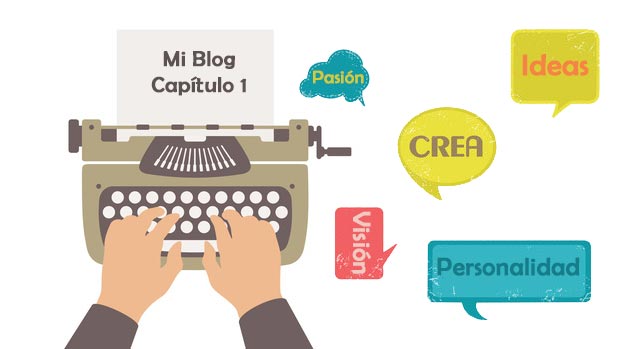
Cómo crear un BlogEl término blog se usa para describir un diario virtual en Internet. El autor de un blogger puede publicar posts sobre cualquier tema. Los posts suelen estar presente de forma cronológica. El estilo de redacción de un blog suele ser informal y se escribe en primera persona. No obstante, además son posibles otros estilos, por ejemplo en el caso de los periódicos online, en los que la atención se centra plus paso a paso y sin conocimientos previos
Start the adventure of create a blog It is a path not exempt from some difficulties and above all decisions that you have to make, and that to a great extent will influence its success or failure. If you think that creating a blog is a guarantee of success with little effort, I will tell you that you are completely wrong, since a blog is almost like a philosophy of life where we are going to write content to create a reading community, a task that will not be easy and that You must put "all the meat on the grill" and put a lot of passion so that you can connect with your followers.
If you target¿Qué es un objetivo?En marketing, un objetivo es el resultado que se pretende alcanzar en un periodo de tiempo, a través el uso de los recursos disponibles. Por tanto, se debe formular de una forma clara y hace falta que sea accesible y medible. plus es crear un blog para publicar contenidos pocos profesionales o con falta de pasión, te recomiendo encarecidamente que no lo crees, there are always bad blogs left over and good blogs are needed, so it depends on you to be in one or the other, although I would recommend that if you are thinking of creating your first blog, not only try to make it a good blog but also make an effort to make it the best. To achieve this objective, follow this guide and you will be able to create a blog step by step, and above all in a very simple way.
Step-by-step guide to creating a blog
1.- The first choice.
 <noscriptNoScript es un complemento del navegador para Mozilla Firefox, que impide que se cargue en las páginas web contenido como JavaScript, Flash o iFrames. Su objetivo es incrementar la seguridad durante la navegación y quitar la promoción comercial más molesta al cargar sitios web. El términoNoScript tiene un significado distinto en la programación HTML. Cuando JavaScript está desactivado, la etiqueta <noscript> o </noscript> asegura que el usuario pueda ver el plus>
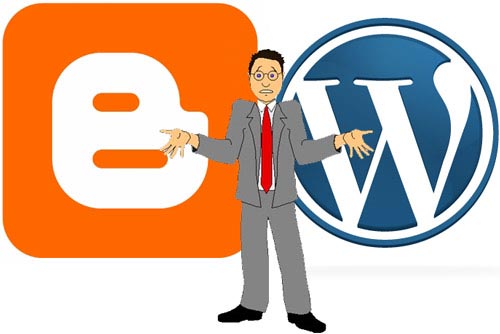
When we are going to create a blog we must make some decisions, surely this is one of the most important decisions but the one that is less important, since you must choose to create a free blog through Blogger or WordPress, or create your own blog without third-party dependencies.
When should we choose a free blog?
Si quieres crear un blog por hobbie y no tienes ningún interés económico en ello, crear un blog gratuito puede ser una buena solución para ti. Por descontado, si no queremos ganar dinero en un domainUn dominio es una sección de Internet con direcciones que comparten un sufijo común o están bajo el control de una organización o individuo en particular. Está organizado jerárquicamente. Tanto los objetos físicos como los virtuales pueden ser direccionados con el nombre de dominio. Estos objetos pueden ser webs, ordenadores en red o servicios, como impresoras, faxes o servidores de correo. Cada objeto está referenciado por una dirección IP única, plus y un hosting todos los años, es decir, si nos queremos ahorrar unos 70 u 80 euros al año, también en este caso es una buena elección el crear un blog gratuito, pero nunca debemos hacerlo con un fin profesional.
What is the difference from creating a free blog to your own?
We must know that if we are going to create a free blog we will be with a corset y no podremos instalar plugins. Los plugins en WordPressWordPress es el software de blogs líder en el mundo, y es concretamente fácil de utilizar y adaptable. Con WordPress, es factible crear con éxito sitios web con la ayuda de funciones ya predefinidas, sin mucho esfuerzo, y para proporcionar contenido como texto, imagen y vídeo. No se requiere conocimiento de HTML. WordPress además facilita la gestión y el mantenimiento de contenidos extensos. Al mismo tiempo de su fácil manejo, plus son una herramienta muy importante para la optimización del mismo, ya sea para mejorar su posicionamiento en buscadores o SEO ¿Qué es SEO o search engine optimization? Conjunto de prácticas destinadas a mejorar el posicionamiento de una web en el ranking de resultados de los motores de búsqueda. Al contrario que la estrategia SEM, que contempla la inclusión de enlaces contratados para obtener este objetivo, el procedimiento SEO se ocupa exclusivamente de los resultados naturales (no pagados) localizados por el algoritmo propio de cada buscador. Para esto contempla ajustar plus, o para mejorar su accessibilityAccesibilidad significa que algo puede ser usado, obtenido, acercado, ingresado o alcanzado. De ello pueden derivarse dos significados aplicables a Internet. En primer lugar, la provisión de acceso a Internet a las personas con discapacidad o a las personas mayores lo más libre viable de barreras y, en segundo lugar, la accesibilidad y la legibilidad de una web para un crawler. Accesibilidad en términos de ausencia de barreras Actualmente, Internet plus y usabilidad.
Another aspect to take into account is that we will not have a professional theme for our blog, but a standard and free one, therefore the base code of the blog will not be sufficiently optimized.
In conclusion, at create a free blog we will have a limited tool to make ourselves known, while a blog with its own domain and hosting is a very versatile and efficient tool to achieve a reading community.
2.- Choose a good domain name
 For the choice of the domain of our blog we have two options:
- Fomentar nuestra marca personal o Personal BrandingBranding es una definición del marketing clásico y es la práctica de crear un nombre, símbolo o diseño que identifique y diferencie un producto de otros. Una estrategia de marca eficaz te proporciona una gran utilidad en mercados cada vez más competitivos. Campañas de branding en marketing En las campañas de branding, se hace especial hincapié en el uso de la marca propia de una empresa en la promoción comercial. plus, for example www.miguelflorido.com. In this way, you will get your name and personal brand to acquire great popularity in the sector, but it will take you more time to find a place in the best search engine results.
- Orient the name to the most important keywords, for example, www.turismoencadiz.com. In this way we will be able to position ourselves before with our two most relevant terms, in this case with "tourism" and "Cádiz", although Google has told us ad nauseam that it no longer takes it into account, the truth is that it is still giving good results .
It's up to you to choose between receiving more visits or improving your personal brand. Which do you prefer?.
Do we choose a .com or .es domain?
Another question that I am asked a lot when creating a blog is the typical question that arises when choosing a domain, that is, What do I choose a domain .com or a .is?. Se trata de una duda habitual cuando se tiene poca experiencia, pero no debemos caer en el error de elegirla en función de si suena mejor o porque me gusta más como queda, la elección debe realizarse en función de donde se encuentre nuestro targetConcepto de Target¿Qué es el Target?El Target es uno de los conceptos primordiales del marketing. Se usa para hablar del público al que se destinan las acciones y estrategias de cualquier campaña publicitaria o comercial. Es el objetivo al que ha de hablarle marca para suministrarle sus servicios o productos, aquellos a los que les interesa lo que brindan o pueda resultarle interesante por afinidad o por necesidades.Es uno de plus de lectores, si está en España elegiremos .es, si en cambio queremos darle un carácter internacional elegiremos el .com.
3.- Contract your domain and hosting
Cuando vamos elegir la empresa donde contratar el dominio y hosting podemos cometer el error de elegir la más barata, algo así como 1&Concepto de AMP¿Qué es el AMP o Accelerated Mobile Pages?El AMP, abreviatura de Accelerated Mobile Pages, es una propuesta que empezó a tomar forma en el año 2016 con la finalidad de mejorar la usabilidad, lectura y, en general, la experiencia de los usuarios de teléfono celular dentro de cualquier página web. Emprendida por Google con un aperturismo total (es de código abierto), lleva en activo desde entonces para facilitar plus;1, pero verás cómo os arrepentiréis de la decisión, pero ¿por qué ocurre esto?, la respuesta es muy sencilla, ya que no todos los hosting están igual de optimizados para sacar el máximo partido de un blog en WordPress, y algunos de ellos pueden tener limitaciones que puedan reducir la eficacia del mismo. Un ejemplo de ello es la memoria que dedican de base que es de 64 mb, cuando lo recomendable son 256 mb.
Low memory problems?
- Choose plugins very well because memory won't let you install many.
- Does the white screen in WordPress sound like something to you? Well, you have to know that one of the reasons why it happens is due to the overflow of the existing memory.
- Slow speed. Very bad for SEO.
If you are going to hire a web hosting, check very well the optimal requirements for WordPress which are:
- PHP 5.2.4 or higher.
- MySQL 5.0.15 or higher.
- Apache mod_rewrite module. Although this module is optional, it is highly recommended to have it.
- Memory 256 mb.
- 1GB minimum storage.
- (Optional) CDN. There are hosting that offer it to us as a service of the hosting itself and at no cost, which is highly recommended to help us improve the loading speed of our blog.
Another aspect that we must value very and much when choosing the hosting is the support, since if we have a problem with our blog it is very important that they solve it properly and in the shortest possible time. For that reason, I recommend that you hire a hosting that you can chat directly with the technicians and that they look at your problem at the same moment, I do not care if it is a Spanish or American hosting, and flee from all those that the only way to register a ticket is calling, that is, paying or sending an email, we do not know for sure when they will review it.
Right now I just remembered an anecdote that happened to me when I created my blog and hired the hosting, which I will tell you below; 3 years ago I chose a bad Spanish hosting that begins with A ..., surely you know what it is and I began to have many problems with its availability and I opened a ticket via the form, and I really am not deceiving you, I received the answer the same 7 days later, saying that it was my fault because the blog was wrongly programmed, then I made a backup copy of it and migrated it as it was to an American hosting, and the problem was magically solved, so I understand that it is typical to throw the blame someone else, but this is inadmissible for a hosting company, that is, we cannot reduce the fact that we cannot find a solution to the problem, to that it is not our problem. I hope the anecdote helps you not to fall into its clutches….
4.- Choose the theme or template
Nowadays buying a professional template is super cheap and highly recommended, instead of starting from a basic and free template. Buying this template will cost us from 30 to 40 euros and in this way we can access a super optimized template, and that without a doubt, will position in less time than a basic one.
Where do we choose the template?
I recommend that you go to the largest WordPress template bazaar called Themeforest, although you can buy templates in any professional company, the objective is to find a template that best suits our needs and that is always a professional theme.
If you do not know which template you can use, I recommend that you look at those blogs that you like the most and find out the template they use, in order to do so we are going to use the free online tool What Wordpres is theme that?. It has a daily limit of searches but the amount it allows is high and it is difficult to reach that limit.
5.- WordPress installation
If you are totally convinced and you are going to create a blog in WordPress hiring your own domain and hosting, the first thing you should know is that technical knowledge is not required for its installation and start-up, do not be fooled with installation costs since installing a WordPress is reduced to a mouse click.
For this we only have to log into our hosting and look for the section to install WordPress and decide in which folder we are going to install it, we must be careful with this because it is normal that we install it in the root, although by default the installation in a folder .
There are three possible places to install a blog in WordPress:
- At the root, it is the most used and the one that I recommend.
- In a folder, it is used when you have a website or store with another web tool.
- In a subdomainConcepto de Subdominio¿Qué es un Subdominio?Un Subdominio es una extensión que se añade al nombre de un dominio para organizar las distintos secciones que pueda tener su web, aún cuando funcionando de forma totalmente independiente a esta. Por lo general, generalmente son palabras que lo preceden y que se separan de él utilizando un punto para remarcar tanto su independencia como la idea de que son algo desligado del contenido plus. Es la menos habitual pero también es una solución factible, aunque debemos tener en cuenta que la autoridad del subdominio partirá desde cero, en cambio a la instalación en una carpeta que heredad la propia autoridad del dominio.
If you have any questions about the installation, leave me a comment below and I will solve it for you.
6.- Install and configure the WordPress theme.
There are three ways to install a theme:
1.- Through the WordPress backend, we click on Appearance> Themes and click on the tab install themes and then upload, as shown in the image.
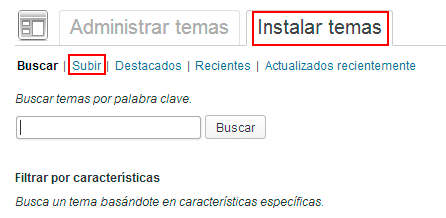
In order to upload a template we must have the theme compressed in a zip, that is, the template folder must be compressed in a zip and not in a rar. Once it is installed we must go back to Appearance> Themes and activate it.
2.- A través de un ftpConcepto de FTP/¿Qué es el FTP?Un FTP, siglas de Protocolo de Transferencia de Archivos (File Transfer Protocol), es un sistema que se emplea para transferir datos entre un PC local y la web, o viceversa, que suele encontrarse siempre disponible dentro del alojamiento de cualquier compañía que haya contratado los servicios de uno para alojar un dominio y llevar adelante todas esas tareas imprescindibles para abrir una página web. Es plus. For this we must create an ftp account through the hosting and configure it with a free ftp client such as Filezilla. Once we are connected to our domain, we will have to go to the installation folder that we will find in wp-content / themes and there we will upload the unzipped folder, it is just a matter of dragging the folder and that's it. The process will take about 15 or 30 minutes, therefore it is much slower than the first option, which is practically immediate.
3.- Through the hosting's own ftp. In this case, what we will do is look for the installation folder, that is, wp-contect / themes and there we will upload the template in zip format, the process will only cost a few seconds, then we will click on the uploaded file with the second button mouse and we will unzip or extract. To do this method you must have certain knowledge of using an ftp tool and in my opinion it is the most professional and recommended, why? It is very simple, method one can give us problems if the file size is very large , and method 2 can leave a file making the copy, especially if we are dealing with a template with many files. The only one that never fails, rain or shine, is the third method.
7.- Correctly configure WordPress
A very common mistake when creating a blog in WordPress for the first time it is to think that it is already configured by default and that we can start writing articles like crazy, but it is a monumental error because it is a super basic and important aspect to configure our WordPress correctly.
Where do we start?
We will start with the settings section and we will see each of its sections:
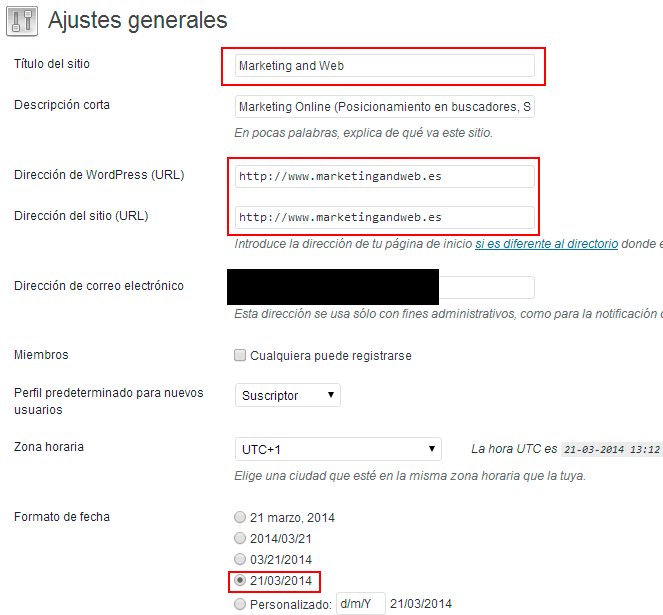
A.-Generals. Aquí nos interesa decidir 3 aspectos importantes; el título de nuestro blog, la urlEl URL (Localizador Uniforme de Recursos), es una dirección definida que apunta a la posición de un archivo en un servidor y lo recupera. Las URL se introducen en un navegador web para ingresar a documentos en la web o se incrustan como hipervínculos dentro de un documento. Se puede usar un Permalink para que una URL esté disponible de forma permanente. Componentes de una URL • prefijo de protocolo plus con o sin www y la fecha. Por defecto WordPress instala la web sin www, a mi particularmente me gusta más con las 3 w, pero esto es sólo es una cuestión de aspecto visual ya que ambas opciones son igual de válidas.
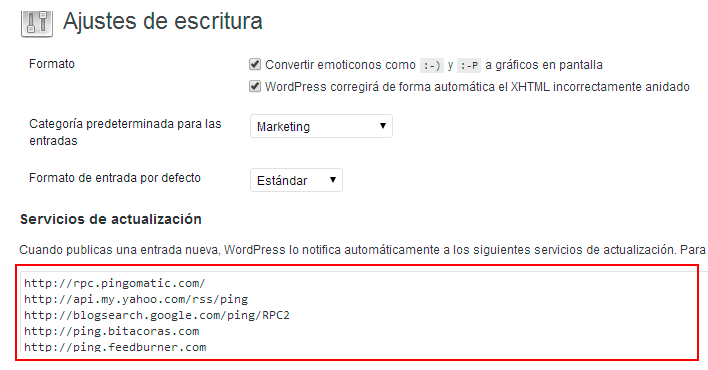
B.- Writing. In this section it is interesting to add a service to which WordPress will notify each time a new post is published.
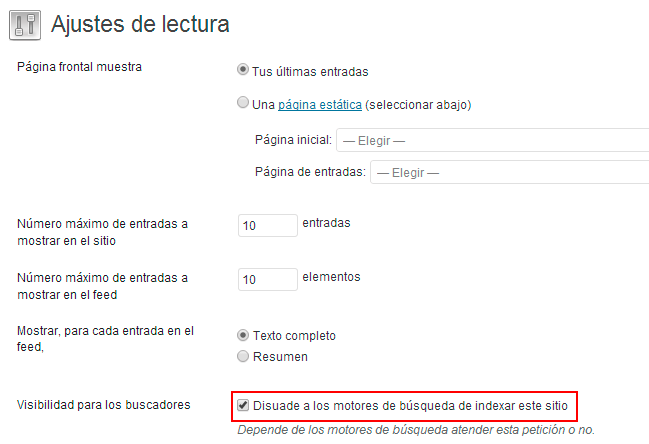
C.- Reading. Activa la opción de “Disuade a los search enginesConcepto de Motores de Búsqueda¿Qué son los Motores de Búsqueda?Los Motores de búsqueda, o Search Engines, son lo que se conoce comúnmente como buscadores. Todos aquellos sistemas informáticos que trabajan buscando todos los archivos almacenados en internet por medio de de arañas o crawlers para elaborar páginas de resultados que sirvan para que los usuarios accedan a webs tras realizar una búsqueda. Son los responsables de que, al buscar cualquier plus de indexar este sitio”, ya que no queremos que Google lo indexe hasta que tengamos totalmente acabado el blog y con un buen número de entradas para publicar.
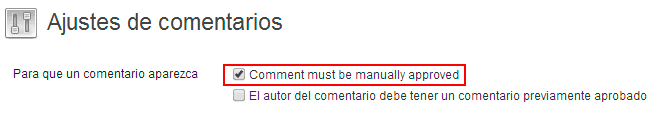
D.- Comments. By default the moderation of comments is not activated and it is important that we check the box that appears in the following image.
E.- Media. In this section we will configure the different sizes of the images, although in many cases the default values can be used to start our blog.
F.- Permanent links. In this section we are going to define the structure that the urls of our blog entries will have. It is therefore a vitally important aspect, since a bad construction of the url can be a bad start and a heavy burden in the future if we want to change it.
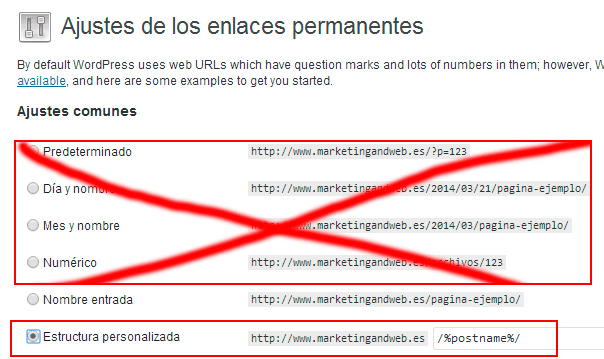
In the image you can see how I have literally crossed out the first 4 options that WordPress offers us, the most recommended options are "Entry name" or "Custom structure", and in this case that shows the image in both they will obtain the same result as url.
8.- Install and configure the most essential plugins
WordPress es sin lugar a dudas la mejor herramienta para crear un blog. Son muchas las ventajas que nos aporta este CMSConcepto de CMS¿Qué es un CMS o Sistema de Administración de Contenido?Un CMS, siglas de Content Management System, es un tipo de software que se elabora con la finalidad de ofrecer una plataforma con la que facilitar la gestión y la administración de contenidos de cualquier web. Son herramientas pensadas para que cualquier persona, sin tener conocimiento alguno de informática, pueda publicar contenidos en una página sin ningún tipo de plus, pero quizás una de las más importantes son todos los beneficios que nos aportan sus plugins a la hora de optimizar el blog.
Next I will briefly explain the 10 essential plugins to create a blog in WordPress:
East pluginConcepto de Plugin¿Qué es un Plugin?Un Plugin es un fragmento o componente de código hecho para ampliar las funciones de un programa o de una herramienta. En el ámbito del marketing digital, especialmente dentro del marketing de contenidos, es algo que se utiliza con mucha frecuencia dentro de entornos como WordPress, puesto que sirven al momento de contar con añadidos que hagan mucho más cómoda y completa la experiencia de plus no puede faltar en ningún WordPress y podríamos decir que son varios plugins en uno sólo, por sus grandes y variadas virtudes, tanto a nivel de SEO, como sitemapUn sitemap o mapa del sitio es una representación estructurada de todas las páginas de una web. Tanto la estructura del sitio como los enlaces individuales entre las páginas pueden ser listados. Se pueden distinguir dos tipos de sitemaps distintos, HTML sitemaps y XML sitemaps. El sitemap HTML como árbol de navegación y vista general Los sitemaps HTML se pueden usar en las webs como una lista de todas las plus, utilizando el las migas de pan o también conocidas como breadcrumbBreadcrumb es una navegación secundaria dentro de una web (además llamada navegación de miga de pan). Breadcrumbs ofrece a los usuarios de la web la opción, en forma de enlaces internos, de volver rápidamente a la página principal o a otro nivel de la web. Gracias a la navegación con migas de pan, el usuario puede reconstruir qué páginas ha visitado anteriormente. Esta navegación secundaria suele construirse jerárquicamente según la plus, y un largo etc.
I leave you a fantastic video of the great Iván García, where you can surely answer any questions about the configuration of WordPress SEO by Yoast.
2.- WP Super Cache and W3 Total Cache
2 Fantastic plugins for cache management and that our blog loads much faster. The first is the easiest to configure and start up, but the second is much more complete, but requires some technical knowledge when setting it up.
Olvídate de poner el “alt text” o texto alternativoConcepto de Texto alternativo¿Qué es el Texto alternativo?El Texto alternativo es un tipo de escrito, texto, que se usa en páginas web para facilitar la información en caso de problemas de carga, errores al enlazar imágenes o cualquier situación que impida ver el contenido de la imagen a la que está enlazado. Es una técnica que guarda especial vinculación tanto con la usabilidad como con el posicionamiento SEO.Un concepto implantado plus y deja que este plugin lo haga por ti.
You will not be able to live without it, since it will send us an email every time it detects broken links on our blog, and in this way it makes it much easier for us to locate and eliminate it.
5.- BJ Lazy load
If you do not have a CDN, it is important that you configure your blog so that it downloads only the images that the user is viewing and in this way make the blog go much faster (speed equals better search engine positioning).
6.- Digg Digg
It adds a floating bar with the bookmarks of the social networks that we choose, thus allowing our articles to circulate more easily through social networks.
It is highly recommended to add a box with author information and links to social networks at the bottom of each blog entry for them to follow.
8.- Cookie Law Info
One of many cookie plugins so that we can comply with the change in the law regarding the use we make of the famous cookies on our website.
9.- Contact Form 7
It allows us to add contact forms to our blog very easily.
Replace the basic WordPress comment system with this much more attractive and integrated with social networks.
9.- Customize your blog
Para personalizar tu blog lo primero que debes definir es el número de apartados que confeccionará el menú, así como el contentsEl contenido puede ser muy difícil de definir con precisión. Es una definición que se refiere a las declaraciones contenidas en un documento o publicación de cualquier tipo y puede incluir las tecnologías de la información y la comunicación. Esto cubre todos los tipos de medios como imágenes y texto. A parte de esto, en el campo de la optimización de motores de búsqueda, los términos duplicar contenido, contenido único, plus de cada uno de ellos.
On the home page we must decide the structure and content that we want to appear.
You must know how to differentiate between the pages of the posts; We use the pages to upload static content, and where we do not want to interact with users, such as (who we are, services, contact, etc.), and the entries are the articles that we are going to upload to the blog.
You should also take into account when deciding what information you want to appear in each widget or sidebar. Depending on the template, we can customize this bar uniquely for each page, giving the blog a sensational look.
It is important to have your own image (logo and style manual) to publicize our brand through that image.
In this regard, I always recommend that you hire the services of a good designer so that the image of our blog is unique and very attractive.
If you do not have the budget to find a designer, try to customize the theme you have chosen as much as possible, so that you make it yours.
10.- Define the category structure
Google has repeated ad nauseam of the importance of generating a good tree structure for a blog.
How do we do this? Should my blog be more specific or more diverse?
We must think carefully and calmly about a structure of categories and subcategories (if necessary) so that we send a clear message to Google, and it is easy to distinguish in which subject or classification it should include us. It is not highly recommended to diversify a lot, it is preferable to take 2 or 3 topics and go deeply into them, as my grandmother used to say "Jack of all trades, master of none".
Creating the category structure is a preliminary step before starting to write and publish articles.
Normally in this section there are usually many doubts about it, if this is your case, leave me a comment and I will answer you as soon as possible.
11.- Crea una cuenta de Google WebmasterEl término webmaster fue utilizado por primera vez por Tim Berners-Lee, el inventor de la World Wide Web, en su documento "Style Guide for Online Hypertext". La palabra se compone de las palabras inglesas "web", forma corta de World Wide Web y "master". En los primeros días de la WWW, a principios de la década de 1990, el término se usaba principalmente como un nombre profesional para las personas que disponen plus and Google analyticsConcepto de Google Analytics¿Qué es Google Analytics?Google Analytics es una de las herramientas SEO gratuitas y más populares al momento de realizar la analítica de una web. Es un panel web que se emplea para conocer el tráfico web de una página, el volumen de usuarios que se mueven en tiempo real, la procedencia de las visitas y toda esa información útil para establecer el comportamiento de una página con plus
Once we have created our blog and we want to present it in society, before starting to show it to acquaintances or friends we must present it to Mr. Google. For this we will create an account of Google Webmaster and we will define if the objective of our blog is a national audience or not, as well as we will add our sitemap so that Google indexes our contents before.
If I don't create the Webmaster account, won't Google index my content?
As long as we allow it from our website's own configuration, Google indexes practically everything, but the time it takes to do so is far away when we do not inform you of where you should read our website map.
We must verify that we are the owner of the website before starting to work with it, for this we will upload a file to the root and click on verify.
Create an account Google analytics It will help us measure the results our blog is getting.
It is also interesting because it will help us when it comes to seeing which content is having the most success on the blog.
12.- Integrate your blog with social networks.
Si vas a crear un blog e imprescindible la integración con las redes sociales no se trata de poner los enlaces a los diferentes cuentas de redes sociales del blog o del autor, ni mucho menos, el objetivo de integrar es que añadamos cajetines en nuestro blog con los últimos tweets de TwitterTwitter es una red social en Internet que permite a los usuarios difundir información en tiempo real. La característica más notable de twitter solía ser su limitación de tweets a 140 caracteres, pero en septiembre de 2017 se incrementó a 280 caracteres. El único requerimiento para utilizar Twitter es la creación de una cuenta gratuita. Tweets Twitter contiene pequeñas piezas de información llamada tweets. Se puede escribir un máximo de plus o los últimos postConcepto de Post¿Qué es un Post?Un Post es todo aquel contenido, sea post, opinión, noticia u otro género, que un autor publica en un blog. Este puede ser de carácter corporativo o meramente ocioso; pero siempre tiene como meta arrojar información o reflejar una idea, al mismo tiempo de facilitar que los usuarios encuentren la web donde se recoge por medio de de buscadores y demás plataformas online.Generalmente, se han plus FacebookConcepto de Facebook¿Qué es Facebook?Facebook es una red social hecha por personas y pensada para conectar a personas. Es una de las pioneras de este sector, una de las primeras plataformas que llegaron a Internet con la finalidad de facilitar la comunicación entre usuarios de todas partes, compartir información y contactar con familiares lejanos, amistades o conocidos.Hoy en día, es la red más popular de todo Internet. Nacida en 2004 plus o Google+, para que de esta forma un lector de nuestro blog puede acceder a los contenidos que estamos publicando en cualquier de nuestros perfiles de redes sociales.
Las redes sociales son una ventana fantástica para crear y fidelizar una comunidad de usuarios, y un elemento que debemos utilizar si o si, si queremos que nuestros contenidos alcancen cierta viralityConcepto de Viralidad¿Qué es la Viralidad?La viralidad es ese fenómeno que consigue que un contenido pase de ser normal a ser un viral. Se usa para definir a la idea con la que se presenta a toda aquella imagen, vídeo, texto o formato de cualquier tipo que, por la razón que sea, consigue una visibilidad abrumadora tanto dentro como fuera de la red por la difusión que el público le plus. Las redes sociales también son uno de los principales factores del SEO, por lo que si nos ayudan a mejorar nuestra visibilidad en Google esto permitirá recibir un mayor número de visitas.
Don't just limit yourself to creating social media profiles and starting to publish tweets and posts, since the ideal is that we carry out a Social Media strategy.
13.- Create your author's brand. The copyright mark is the way in which we communicate the authorship of our content to the Google search engine. Because it is important?
Mainly it is important for 2 reasons:
A) It gives us a more attractive result and with different links that can increase clicks on the search result.

B) Minimiza la posibilidad de que otro usuario se apropie de tu contenido o de generar duplicate contentEl término contenido duplicado, o duplicate content proviene de SEO. El contenido duplicado se crea cuando se puede ingresar al mismo contenido con distintos URL y se indexa con distintos URL. La indexación de sitios web con contenido duplicado puede tener un efecto negativo en el Ranking en los SERPs. Tipos de contenido duplicado El contenido duplicado puede surgir si: • El contenido es sindicado, vendido o copiado ilegalmente, entonces plus.
How do we do it?
1.- Crear una cuenta de Google+. Para ello necesitaremos disponer de una cuenta gmailGmail o Google mail es un servicio de email sin costes proporcionado por el motor de búsqueda Google. Está habilitada en más de 50 idiomas y se financia por medio de promoción comercial. Con Gmail, los mensajes de email se pueden enviar y recibir mediante de una interfaz de navegador en un equipo doméstico. Además se puede usar con smartphones (iOS y Android) o tablets. Existe versión de pago de plus, en el caso de que no tengáis una cuenta de gmail, debéis acceder a www.gmail.com y crearla.
2.- Once the gmail account is created, you can click on our name in the upper right corner to access Googe + or click on https://plus.google.com/?hl=es
3.- Upload our photo to the Google+ profile. We click on the gray circle and attach our photo.
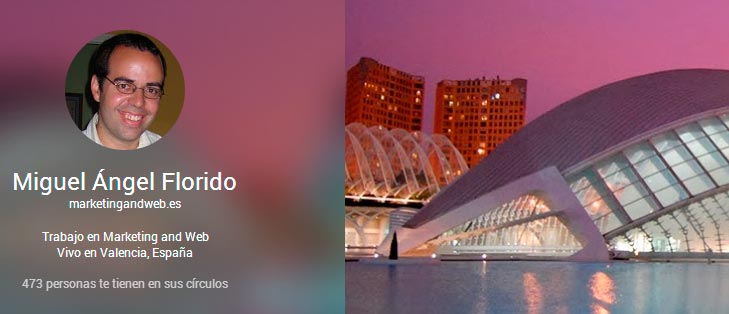
4.- In the next step we are going to tell Google that we are a contributor to our blog, for this we click on http://plus.google.com/me/about/edit and then we click again at the top on links, until we reach this image.
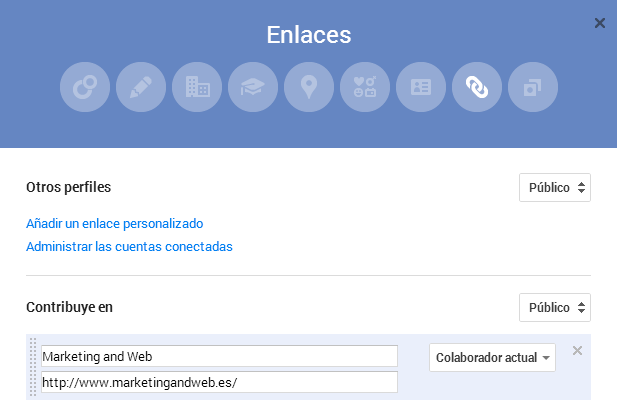
Debéis hace clic en añadir un linkConcepto de Dominio¿Qué es un Enlace?En Internet, un link, además conocido como enlace o hipervínculo, es cualquier texto o imagen que se encuentra en una página web y en la que el usuario puede pulsar o clicar para ser dirigido a otro contenido distinto. Es el principal medio de “desplazamiento” en la red, puesto que se encuentra presente en prácticamente cualquier portal que visites a día de hoy, inclusive en plus personalizado en el apartado Contribuye en, escribiendo los datos tal y como aparecen en la imagen anterior. Finalmente hacemos clic en guardar.
6.- Once all the changes have been made, you can verify if the Google+ profile has been linked well with the blog content, for this it is as simple as clicking on https://www.google.com/webmasters/tools/richsnippets, and add the url of any of your entries, to see if our Google+ image appears.
14.- What and how to write articles on your blog.
Are you ready to start your journey on the blog?
Before I start writing I would like to give you some advice:
1.- Analyze your target
Lo primero que debes pensar y analizar es al público al que te quieres dirigir, o dicho de otra forma, pensar en que grupo de personsLas personas son personalidades imaginarias que representan a un determinado grupo objetivo. En el marketing online, las personas ayudan a entender mejor a los usuarios de un portal web o a los clientes de una tienda online. Concepto de personas Para que las personas puedan ejercer su efecto positivo, deben ser lo más detalladas viable. Esto conlleva un término exhaustiva de los grupos destinatarios para conseguir datos empíricos. La próxima plus te gustaría que fuesen los lectores de tus artículos.
2.- The search for your own style
There are many people who talk about the search for a style and a personality when writing, but that style surely underlies each one of us, so be yourself and do not imitate anyone, and in this way you will create your own style .
3.- Write for your users or for Mr. Google?
It is always advisable to write for people, although it is worth knowing some tips on how to optimize the SEO of the content so that our article reaches a good position in the search engine, and our work is rewarded with thousands of visits.
4.- Is it enough to write articles of 300 to 400 words?
In my opinion it is a mistake to reduce or limit the size of the articles so much. The best thing you can do is not to set limits and not even a specific size, write the article, whatever its length, although I can tell you that Google rewards a content above 1000 words more than one of 400 words, so you decide what extension you are going to give it. An example, this post began with the idea of being an article and has ended more with a guide format and with more than 4,500 words, which I believe to date is the longest article I write on this blog.
In short, I recommend that you dig deeper and provide a lot of useful information in your articles, it is difficult to delve into an article if we are always limited to a specific extension.
5.- The image and the title
Pay close attention when choosing the title of the article and the main image of the article, since both are two key aspects for virality and attracting many visits through social networks. Choose a title that captures attention and / or curiosity to attract their reading.
6.- Efecto ViralConcepto de Viral¿Qué es un Viral?Un viral, o más bien, un contenido viral, es todo aquel que consigue una difusión masiva en internet. Sea por redes sociales, por mails o inclusive por chats de mensajería instantánea como WhatsApp, se caracteriza por lograr un alcance extenso en el ámbito digital de forma rápida.Sea un mensaje en un blog, un tuit de Twitter o un vídeo gracioso, el viral tiene la capacidad plus
Share your article through social networks, for which it is important that you have a community of followers large enough to have a viral impact in a few hours.
No es lo mismo que tengas 60 seguidores en twitter a tener 6.000, aunque debemos tener en cuenta que la calidad del follower¿Qué es un follower?Usuario de las redes sociales que decide seguir las publicaciones de otro usuario –persona, marca o institución– en una determinada plataforma social.Acrónimo o abreviatura:Seguidor: Follower plus siempre va muy por delante de la cantidad de seguidores, así que te recomiendo que tengas seguidores afines a las temáticas que vas a compartir y de esta forma sea más fácil que se propague los contenidos del blog.
7.- LoyaltyConcepto de Fidelización¿Qué es la Fidelización?La fidelización es un mecanismo básico para cualquier empresa, se trata del concepto con el que se hace referencia al método por el que se logra que un cliente que ya haya contado antes con los servicios de una empresa o con sus productos, vuelva a hacerlo y recurra a ella en más ocasiones. Es uno de los items más básicos al momento de mejorar plus de usuarios
You must place the users who read your blog as the most important element of it, since without your followers the blog would have no meaning;
- Do not believe yourself the king of the mambo and reply to your readers, either through comments or email.
- Contribute something that is useful to your followers.
- Create a list of subscribers to del Mailchimp and you can have up to 12,000 subscribers for free.
- Encourage interaction with your readers by being very close and accessible.
15.- Planning
After many hours of work and effort, we will have already created our blog, and we will be able to create or plan our work in the same 3 months ahead.
Why is it important to work in an organized way?
Because we will generate confidence in our readers and we will accustom them to visit us with a certain frequency. To this end, we must establish a number of weekly articles that should be a minimum of 2 weekly up to 5, this last figure could be said to be the most optimal value. Logically, not everyone has the opportunity or the time to write so many articles a week, so very few people allow themselves to publish an article almost every day.
What time is it more convenient to publish my articles?
To answer this question you have to know your readers well and know what are the hours of the day that they are most active on the Internet, and in this way associate this time of publication with the time that more followers are connected to the network.
16.- Conclusions
Like any project that starts, the first months of working with a blog are the bittersweet, because the feedback that we will have from our readers will be very low or practically none, but we must not get discouraged, and continue working day by day, and week after week, until suddenly a week it seems that the blog wakes up, as if it were an erupting volcano and you start to receive thousands of views per month.
It is essential when we are going to create a blog that it is very well built and optimized.
Be yourself when writing your articles and put a lot of passion into it, your readers will appreciate it.
If you have any questions or want me to expand a specific section further, do not hesitate to contact me, it will be a pleasure to help you.
I wish you the best of luck with your blogs.
Infographics: jpccomunicacion.wordpress.com | startingdecero.com
If you are thinking of creating a blog step by step and have any questions, you can leave me a comment
If you liked this guide on how to create a blog step by step, you can share it with a friend.