

Today social networks take a good amount of hours from users. In this regard, popular networks such as, for example, can be InstagramConcepto de Instagram¿Qué es Instagram?Instagram es una de las redes sociales más reconocidas del momento. Comprada por Facebook hace unos años con motivo de su auge en popularidad, se caracteriza por girar en torno a la fotografía y, desde hace poco, al vídeo. Es una red pensada para los amantes de las fotos y para quienes gustan ilustrar lo que hacen con material gráfico.Desde su lanzamiento, ha estado en constante plus, sirven a sus usuarios como medio de expresión, en donde pueden describir como se sienten con una simple foto, o les sirve para compartir recuerdos y capturar momentos. Estas redes sociales, se caracterizan en que los usuarios se pueden seguir entre ellos y cada vez, es usual que las listas de amigos se vayan engrosando.
In this regard, the more friends we have, it is more common to find a greater number of photos to see of these and it is at this time that reposts take more importance.
What is a repost?
Podemos definir al repost como aquella opción que nos permite el compartir un contentsEl contenido puede ser muy difícil de definir con precisión. Es una definición que se refiere a las declaraciones contenidas en un documento o publicación de cualquier tipo y puede incluir las tecnologías de la información y la comunicación. Esto cubre todos los tipos de medios como imágenes y texto. A parte de esto, en el campo de la optimización de motores de búsqueda, los términos duplicar contenido, contenido único, plus de una persona directamente, sin tener la necesidad que subirlo nosotros.
Thus, to share a photo on Instagram we must make a repost.
It is always a quick option, which is linked to a button on the application itself, so regardless of whether you use Instagram Android, or on any other device, the purpose of the repost will always be the same.
From this dynamic, we have to make sense of the reposts on Instagram and it is that, in essence, they can be carried out for different reasons. We are going to mention some of them.
What is a repost for?
Siguiendo con la tónica de Instagram, unos cuantos motivos para hacer repost, podrían ser los siguientes. Aún cuando el principal motivo de un Repost en Instagram o cualquier otra social networkLas redes sociales pueden ser vistas como un canal de marketing que ofrece a los usuarios la posibilidad de producir y compartir información de la manera más fácil, y de comunicarse con otros usuarios. Uno de los ejemplos más famosos de las redes sociales es facebook.com. Historia de las redes sociales Los orígenes de las redes sociales se remontan a mediados de la década de 1990, cuando el término se plus es para compartir el contenido que ha difundido otra persona.
- If a friend of ours has posted a photo with us or with something that can be related to us, we may be interested in sharing it in our story. In order not to have to ask for the photo, upload and, in essence, duplicate content, the fastest way to share it in our story line is by making a free Instagram repost.
- Another example could be that we have been the ones who have taken that photo (but it has been uploaded by another Instagram profile) Y we want to share it because we liked it or basically because we like it, since the person we have portrayed we liked how it turned out.
- As a last example, it may be that we see an image that we appreciate and consider that it is important to highlight being in our story line.
Pese a que hemos hablado de fotos de personsLas personas son personalidades imaginarias que representan a un determinado grupo objetivo. En el marketing online, las personas ayudan a entender mejor a los usuarios de un portal web o a los clientes de una tienda online. Concepto de personas Para que las personas puedan ejercer su efecto positivo, deben ser lo más detalladas viable. Esto conlleva un término exhaustiva de los grupos destinatarios para conseguir datos empíricos. La próxima plus, Instagram es una red social donde hay cabida para todo tipo de imágenes. En este aspecto, es usual a la vez hallar frases, expresiones o inclusive vídeos. De esta dinámica, la gente suele hacer repost a estas frases en concreto por motivos como estar de acuerdo en el contenido de las mismas, o básicamente para compartir con sus followers su estado de ánimo, usando estos repost como una buena manera expresión.
Ahora que hemos visto lo que son estos repost y ya conocemos un poco más acerca del target¿Qué es un objetivo?En marketing, un objetivo es el resultado que se pretende alcanzar en un periodo de tiempo, a través el uso de los recursos disponibles. Por tanto, se debe formular de una forma clara y hace falta que sea accesible y medible. plus de los mismos, básicamente nos queda aclarar un poco cómo podemos llevarlos a cabo, de forma que vamos a ver cómo funcionan, en los distintos dispositivos.
Making this type of publication is a common action and promoted by brands
The truth is that this dynamic of sharing material has become a formula widely used by companies.
Companies seek to be shared or share user content with hundreds of followers, the so-called influencers.
Therefore, they introduce this Instagram action as one more action of their digital marketing strategies.
But sharing is not about something that only commercial brands like.
The ordinary users have also shown their interest in disseminating videos and photographs that they find on this network and that, for some reason, are attractive to them.
However, Instagram does not incorporate a button that allows you to perform this action in a single click. This is the reason why I am going to explain to you what are the methods that you can use to repost the graphic material of other accounts.
Common to all alternatives is the duty to mention the authorship of the owner of the original publication. If you can, while citing the source, ask him.
Learn point by point how to easily and quickly repost on Instagram on Android
Si dispones de un terminal Android y pretendes hacer un Instagram repost, necesitarás una repost appConcepto de APP¿Qué es una APP?Una App es todo aquel programa que se ejecuta desde una interfaz teléfono celular, es decir, desde un móvil o una tablet. Consiste en la herramienta principal para cualquier usuario que tenga un teléfono teléfono celular, de todo el software que se mueve en tiendas digitales como Google Play Store o la App Store y que tanto se adentra en cualquier terminal moderno.Es un concepto plus.
These apps are free and intuitive, so you will be able to repost Instagram for free without any problem.
Let's see how it's done.
To start making a Repost on Instagram of videos or photos, we need an application that allows us to do it. In this circumstance, we are going to follow the steps of a specific application and later I leave you the link to some more so that you can select the one you like the most.
This particular application is called Repost for Instagram and you can download it through this link:
httpsHTTPS (protocolo de Transferencia de Hiper-Texto) es un protocolo que permite determinar una conexión segura entre el servidor y el cliente, que no puede ser interceptada por personas no autorizadas. En resumidas cuentas, es la versión segura de el http (Hyper Text Transfer Protocol) Cómo funciona Una conexión HTTP estándar en Internet puede ser fácilmente secuestrada por partes no autorizadas. El propósito de una conexión HTTPS es evitar esto: encriptar plus://play.google.com/store/aplicaciones/details?id=com.redcactus.repost&hl=es
- The first step is the most obvious and consists of downloading repost on Instagram, the app that will allow us to carry out this action on the device.
- Para esto, básicamente haz click¿Qué es un click?Es la acción de pulsar un botón del ratón una vez colocado el puntero del mismo sobre un elemento determinado de la pantalla. El click determina la interacción del usuario con el sistema.Otras denominaciones: Clic plus por medio de del link de la app facilitado, tocamos en la pestaña de instalar y ya tendremos la app descargándose e instalándose en nuestro dispositivo.
- Once we have the app installed, we go to Instagram and log in to see the photos of our contacts.
This is something necessary, since apparently the program needs to know from the photos of your friends, the address from where to take them to be able to share them later on your profile. Note that if we do not put an account, apparently you will not have access to see the photos that we can see in our account and with which we want to carry out the repost Instagram Stories, videos or photos.
 Now that we are in our account, we will be able to see the photos of our friends and this will be the moment where we will begin to make the Instagram reposts for which we have installed the free application.
Para esto, echamos un vistazo a las imágenes que más nos gusten y nos detenemos en aquella que deseamos hacer el repost. Si te fijas, en la parte de arriba derecha de la foto, verás un menú desplegable, indicado con tres puntitos, que si lo pulsamos, nos ofrecerá la opción de copiar la dirección dirección urlEl URL (Localizador Uniforme de Recursos), es una dirección definida que apunta a la posición de un archivo en un servidor y lo recupera. Las URL se introducen en un navegador web para ingresar a documentos en la web o se incrustan como hipervínculos dentro de un documento. Se puede usar un Permalink para que una URL esté disponible de forma permanente. Componentes de una URL • prefijo de protocolo plus.
Una vez que tenemos la dirección dirección url copiada, el siguiente paso es irnos a la app descargada, donde lograremos observar que sale en la pantalla la imagen que hemos copiado con la dirección dirección url. Si deseamos hacer repost a esta foto, básicamente tenemos que dirigirnos al icono que aparece en la parte de arriba de la pantalla con el LogoConcepto de Logotipo¿Qué es un Logotipo?Un Logotipo, o logo, no es más que el elemento gráfico o visual con el que se dota de identidad a una empresa, negocio, producto o servicio. Es ese símbolo con el que se apela a la memoria visual y con el que se permite dotar de presencia a cualquier tipo de entidad sin necesidad de recurrir a descripciones.De hecho, es más correcto hablar de plus de Instagram, presionar y veremos que en la parte inferior de la imagen, nos aparece la palabra repost. Básicamente presionamos ahí y ya estará todo el trabajo hecho.
Summary for make repost on Instagram with Android, iPhone or any other device.
- First, download InstaRepost on your cell phone device and from the official app store of your operating system, in other words, Google Play StoreConcepto de Google Play Store¿Qué es Google Play Store?Google Play Store es la tienda de apps móviles para dispositivos con sistema operativo Android. Todo programa que se desarrolle con la finalidad de ser utilizado en smartphones o tablets que cuenten con el S.O. de Google ha de aparecer listado en el catálogo de esta tienda para garantizar su seguridad y la aprobación por parte de la compañía.Aún cuando nació con plus o la Apple Store. Once it is installed, proceed to open it.
- Now, you must open the application Instagram and have access with your username and password, as you normally do.
- Followed by this, find the article you want to publish on your profile and open the alternatives menu found in the upper right corner of that post (1).
- Then, among the available alternatives, selecciona “Copiar URL” o “Copy¿Qué es un copy?Texto de carácter publicitario destinado a llamar la atención del cliente potencial y promocionar un producto o servicio determinado. plus LinkConcepto de Dominio¿Qué es un Enlace?En Internet, un link, además conocido como enlace o hipervínculo, es cualquier texto o imagen que se encuentra en una página web y en la que el usuario puede pulsar o clicar para ser dirigido a otro contenido distinto. Es el principal medio de “desplazamiento” en la red, puesto que se encuentra presente en prácticamente cualquier portal que visites a día de hoy, inclusive en plus" (2).
- Once this is done, automatically, the photo or video in question will start to to download and to share it, basically you must click on the button that indicates "Repost".
Despite this, each application is different and has a different way of working. Although we have explained one of them here, it is essential that you know that you have more options, so I leave you the link to some more, so that you can see how they work and have more possibilities to make these reposts.
How to make an Instagram repost from an iPhone
The truth is that the process is practically equivalent to the one you had to follow for Android.
The real difference is that you must go to the App Store to find and choose your favorite application.
Let's see some of the most used:
Repost for Instagram
Download it from here and start using it for your iPhone today, since it's free, just like its Android version.
Repost It for Instagram
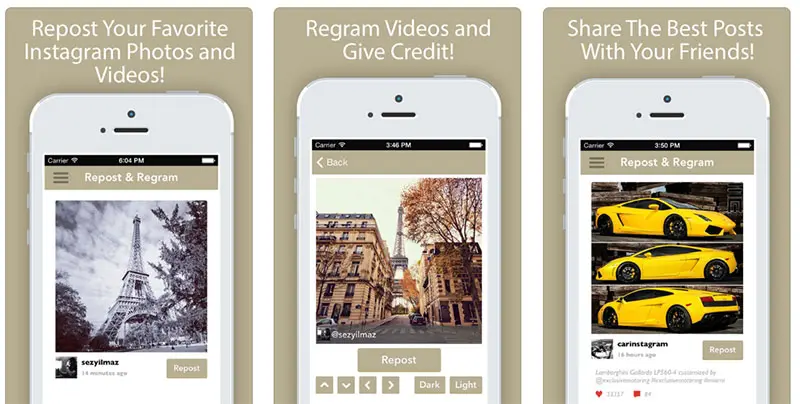
As I mentioned at the beginning, I will make it easy for you with very intuitive apps. And exactly so it is this App for iPhone, which in a few clicks manages to share the contents of your contacts.
Regrammer - Instagram reposter
«Regrammer» has the advantage that, while being just as intuitive as the previous ones, it allows you to see a preview of the content, before moving on to the social network itself.
Using its search engine, you can add the URL of the selected publication and click on "Repost".
How to repost instagram from your computer
In this circumstance, we do find something different. For this, we are going to follow the same steps as the Android case, but nevertheless, we have to emulate the Android system on our PC. From this dynamic, it will be as if the device itself were inside the computer and once installed, it will basically follow the same steps.
For this, the emulator that manages to do this is called BlueStacks and it needs to be installed, from here I leave you the link to its website:
https://www.bluestacks.com/es/index.html
Maybe you are interested edit the photo prior to uploading it. Once we have it installed and open it, it will ask us to connect it with a Google account, in that case, we enter our own personal account and it will be as if we had our own phone on the PC. Thanks to this, we will be able to play our games, view social networks, interact with apps and, of course, the reason why we have installed it, which is to make repost on Instagram from pc.
Therefore, once you have reached this point, you can return to the previous paragraph where I show you how to make it work on Android since the process will be the same, download the essential apps through Google Play and follow the steps one by one. From this dynamic, we will achieve make repost easily from our PC.
In short, these are the easiest ways to use repostapp on Instagram, so that it does not matter what device we are using, basically having an Instagram account, the app necessary to carry out the repost and the desire to do it with A photograph or video will allow us to share these photos without any problem and with great ease.
Now you just have to try everything explained and start sharing the photos that you like the most or match your mood so that all your followers can see them. Sharing these photos through Instagram has never been so easy, as it is possible through these repost apps.






