
The gifsConcepto de Gifs¿Qué son los Gifs?Los Gifs son un formato de imagen que se caracteriza de las tradicionales en que no son estáticos. Son imágenes dinámicas que poseen varios fotogramas y que, por lo general, repiten un bucle que puede durar entre 1 y varios segundos, pero que nunca cuenta con una extensión demasiado prolongada.Es algo que suele verse en foros, en comentarios de redes sociales y en numerosas plataformas plus animados son pequeñas animaciones que se usan ampliamente en la web para agilizar el contentsEl contenido puede ser muy difícil de definir con precisión. Es una definición que se refiere a las declaraciones contenidas en un documento o publicación de cualquier tipo y puede incluir las tecnologías de la información y la comunicación. Esto cubre todos los tipos de medios como imágenes y texto. A parte de esto, en el campo de la optimización de motores de búsqueda, los términos duplicar contenido, contenido único, plus. There are currently a multitude of gifs available, with very varied themes and content.
Si está interesado en animar sus historias, siga leyendo. En el postConcepto de Post¿Qué es un Post?Un Post es todo aquel contenido, sea post, opinión, noticia u otro género, que un autor publica en un blog. Este puede ser de carácter corporativo o meramente ocioso; pero siempre tiene como meta arrojar información o reflejar una idea, al mismo tiempo de facilitar que los usuarios encuentren la web donde se recoge por medio de de buscadores y demás plataformas online.Generalmente, se han plus de hoy te enseñamos cómo utilizar los gifs en las historias de InstagramConcepto de Instagram¿Qué es Instagram?Instagram es una de las redes sociales más reconocidas del momento. Comprada por Facebook hace unos años con motivo de su auge en popularidad, se caracteriza por girar en torno a la fotografía y, desde hace poco, al vídeo. Es una red pensada para los amantes de las fotos y para quienes gustan ilustrar lo que hacen con material gráfico.Desde su lanzamiento, ha estado en constante plus. ¿Te quedas a verlo?
Use gifs in Instagram stories
For some time now, the application has enabled users to add a special touch to their stories by adding dynamic and animated gifs.
Learn to put gifs in stories Instagram, as you will see below, is very easy. You just have to follow these simple steps.
How to put gifs in Instagram stories?
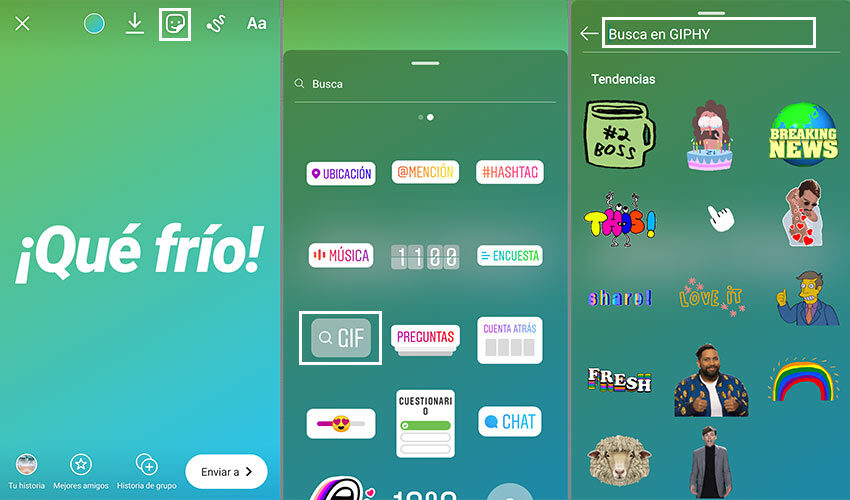
- First, sign in to your account in the app.
- Once inside, click on the icon to create a new story.
- Set up the backgrounds and the texts, as you would on any other occasion.
- When you're all set, click the add stickers icon at the top of the screen (the one with a smiley face on it).
- Next, you need to select the “gif” sticker and click on it.
- A new screen will open in which many gifs will appear to select. You can choose one from the catalog or use the search bar at the top to locate gifs on a specific topic.
- So, you just have to click on share story and... we will have already learned how to put gifs in Instagram stories!
 <noscriptNoScript es un complemento del navegador para Mozilla Firefox, que impide que se cargue en las páginas web contenido como JavaScript, Flash o iFrames. Su objetivo es incrementar la seguridad durante la navegación y quitar la promoción comercial más molesta al cargar sitios web. El términoNoScript tiene un significado distinto en la programación HTML. Cuando JavaScript está desactivado, la etiqueta <noscript> o </noscript> asegura que el usuario pueda ver el plus>
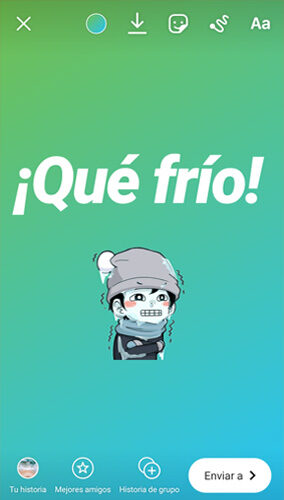
In our case, as an example, we wanted search animations cold related.
For this we have carried out a search and selected among the personalized results. Thus, the image fits perfectly with the text.
How to send gifs by Instagram Direct?
Now that we know how gifs work in Instagram stories, we are going to show you how to send these types of animations. by direct or private. It's very simple!
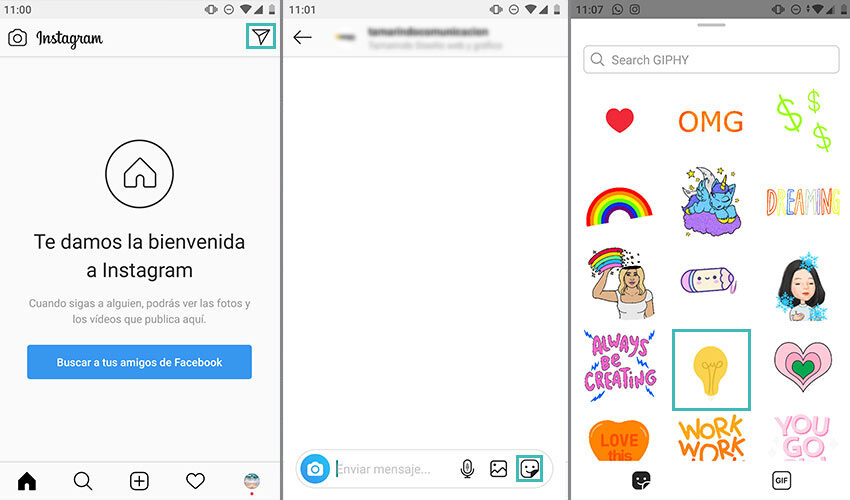
- Once inside your account, click on the “send private message” icon located at the top right of the screen (the one that shows the icon of a paper airplane).
- Next, choose the person you want to send the new private message to.
- Once inside the conversation, at the bottom of the screen, you will see the bar where you regularly write the texts. Locate, in the right area of the bar, the icon with the smiley face symbol and click on it.
- Right after that, some gifs will appear on the screen and a search bar to locate animations by theme.
- Intelligent! You will now know how to send gifs via direct Instagram.
Find the best gifs for Instagram
Now that you are a fan of this type of animation and you know how to send gifs through Instagram direct, you may want to learn how to find the best gifs for Instagram. Different animated images and something more personalized.
In this circumstance, we suggest that instead of searching in the application itself, you create your own gifs animated. To create your own animations, basically open a verified artist profile on Giphy and upload your creations.
On the contrary, if you are interested in uploading animations to your Instagram feed, we will show you how to do it with this simple trick.
Upload gifs to Instagram
as many of you know upload gifs to feed It is something that cannot be done today. Despite everything, there are some other Instagram tricks to achieve it.
If you've gone crazy trying to find a way to add a gif to your feed, don't worry, here's the answer.
As a general rule, when you upload an image in gif format to your Instagram feed, it is done as a normal photo, in other words, without animation.
Therefore, to get it to maintain its movement and animation, it is necessary before convert it to video. We show you how to do it step by step.
- First of all, we need to turn our animated gif into a video. For this we can access the website of cloudconvert.
- Una vez en la web, tendremos que pinchar en «elegir archivo» y, después, seleccionar la imagen animada desde nuestro pc, smartphone o inclusive desde una UrlEl URL (Localizador Uniforme de Recursos), es una dirección definida que apunta a la posición de un archivo en un servidor y lo recupera. Las URL se introducen en un navegador web para ingresar a documentos en la web o se incrustan como hipervínculos dentro de un documento. Se puede usar un Permalink para que una URL esté disponible de forma permanente. Componentes de una URL • prefijo de protocolo plus.
- Cuando lo haya subido, haga clic en «convertir» y se iniciará la conversionConversión es una acción precisa que lleva a cabo un usuario al visitar un portal web. Algunas formas clásica de conversión son, por ejemplo, una compra, una descarga o una suscripción a la newsletter. Un parte del SEO o del Marketing Online es la Optimización de Ratio de Conversión (CRO). En el Marketing de afiliación se usa para la conversión de los editores. Información general Hay diferentes indicadores para medir plus.
- Next, we must click on the button that says "download" to download the video.
- Now that we have our gif turned into a video, we can upload it to our Instagram feed like any other file.

As you have seen, sharing animations on the Instagram feed is not complicated. You just have to know the tricks of Instagram adequate to achieve it.
Finally, using animated images is pretty easy right now, especially since Instagram added the ability to search and embed the gifs on Instagram stories.
If you liked this post, we suggest you take a look at how to create Instagram story highlights, you will love it!






