
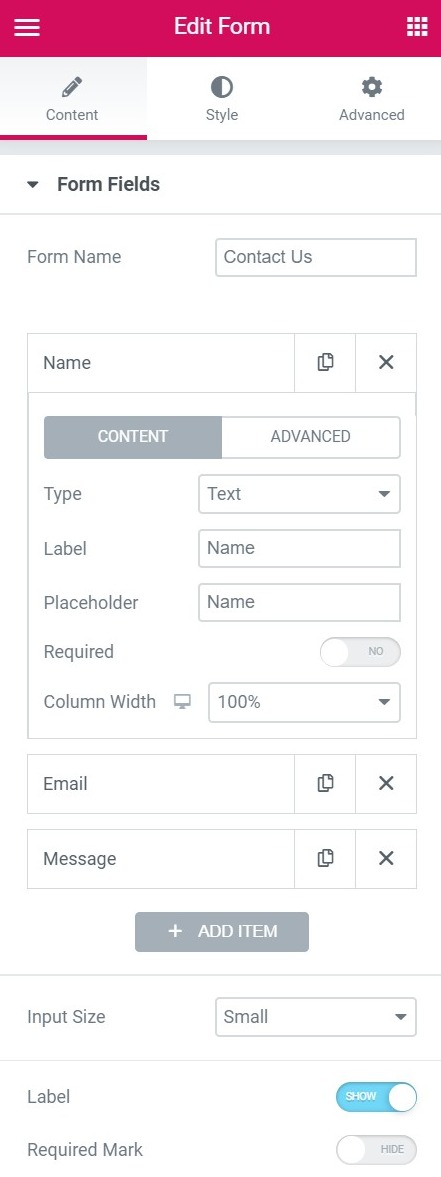
Form name - Name the form.
Form fields - A list of the fields on your form. You can duplicate, add or delete fields as you like. You can drag and drop to change their order.
Click on a field to view its settings.
- Type - Choose the type of field you want (a list of types here)
- Label - The name of the field, which is shown in the form and in the email received from the user.
- Position marker - The display name of the field's interface.
- Necessary - Activate it to set the field as a required field.
- Column width - Allows you to set the width of the field. If you want a form with two fields in a row, set each field to 50%.
Field types
- Text - A simple text field. that is, name
- E-mail - A type of email. Includes email validation
- Text area - A type of text area. You can set the number of rows
- UrlEl URL (Localizador Uniforme de Recursos), es una dirección definida que apunta a la posición de un archivo en un servidor y lo recupera. Las URL se introducen en un navegador web para ingresar a documentos en la web o se incrustan como hipervínculos dentro de un documento. Se puede usar un Permalink para que una URL esté disponible de forma permanente. Componentes de una URL • prefijo de protocolo plus - A website URL field
- Tel - A type of phone number
- Radio - A type of radio. Single choice. You can swipe Online List to get horizontal style. Click to see more options
- Please select - A select guy. Drop-down list of options. It can be set to multiple selection. Click to see more options
- Box - A type of check box. Check one or more options. You can swipe Online List to get horizontal style. Click to see more options
- Acceptance - Add a checkbox of terms for the user to accept
- Number - A type of number
- Date - Add a date picker field
- Time - Add a time selector field
- Upload file - Allow your users to upload files
- Password - Add a password field
- HTMLHTML (Hypertext Markup Language) se usa para estructurar el contenido de texto de un documento web. No sólo se marca el contenido, sino además la meta-información que describe este contenido. Las páginas HTML se almacenan normalmente en el directorio raíz del servidor. Cómo se creó En la era digital, a los usuarios les resulta difícil hallar su camino en las webs y hacer un seguimiento de las estructuras de las plus - Add an HTML field
- Hidden - Add a hidden field. Hidden from the user, but visible to the administrator
- He passed - Add a step field for a multi-step form
- reCAPTCHA - Add a reCAPTCHA. reCAPTCHA verifies that the user is not a robot
- Jar of honey - Add a Honeypot to your form
- Inlet size - Set the height of the fields.
- Label - Show or hide the labels on the form.
 es un protocolo que permite determinar una conexión segura entre el servidor y el cliente, que no puede ser interceptada por personas no autorizadas. En resumidas cuentas, es la versión segura de el http (Hyper Text Transfer Protocol) Cómo funciona Una conexión HTTP estándar en Internet puede ser fácilmente secuestrada por partes no autorizadas. El propósito de una conexión HTTPS es evitar esto: encriptar<span class="glossaryai-more-link"> <a href="https://rmarketingdigital.com/en/wiki/https/" data-wpel-link="internal">más</a></span></span></span></span></span>://rmarketingdigital.com/wp-content/uploads/2020/09/file-iPCcL3fL1E-4669106.jpg)
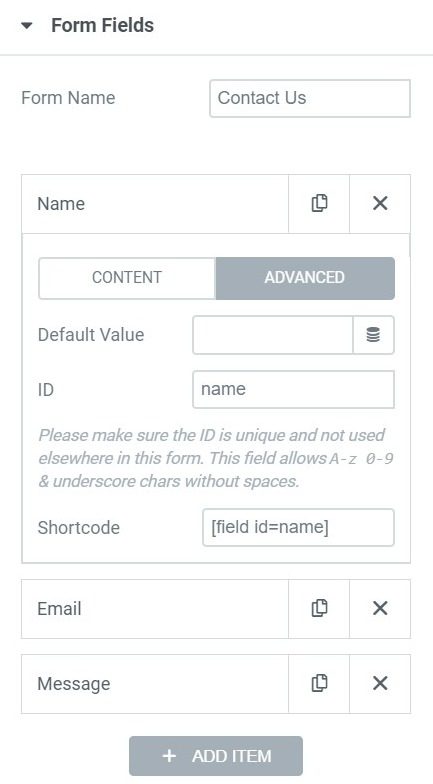
Advanced tab Form fields
More form options
This page describes the form Fields options. For other form options, click on one of the links below:
CONTENTEl contenido puede ser muy difícil de definir con precisión. Es una definición que se refiere a las declaraciones contenidas en un documento o publicación de cualquier tipo y puede incluir las tecnologías de la información y la comunicación. Esto cubre todos los tipos de medios como imágenes y texto. A parte de esto, en el campo de la optimización de motores de búsqueda, los términos duplicar contenido, contenido único, plus
- Form fields
- Submit button
- Actions after submitting
- Additional options
STYLE
- To form
- Field
- Button
- Messages
Nota: el browserUn navegador (además: browser) es una herramienta informática que te permite ver documentos y datos y navegar por la red. Los navegadores pueden mostrar distintos tipos de recursos de información; principalmente documentos HTML, a pesar de todo, además son posibles otros tipos de archivos y contenido multimedia, como PDF, JPEG, MPEG, GIF o el lenguaje de meta marcado. A través el uso de complementos especiales y la configuración respectivo, los plus controla todos los mensajes de error de campo.








