
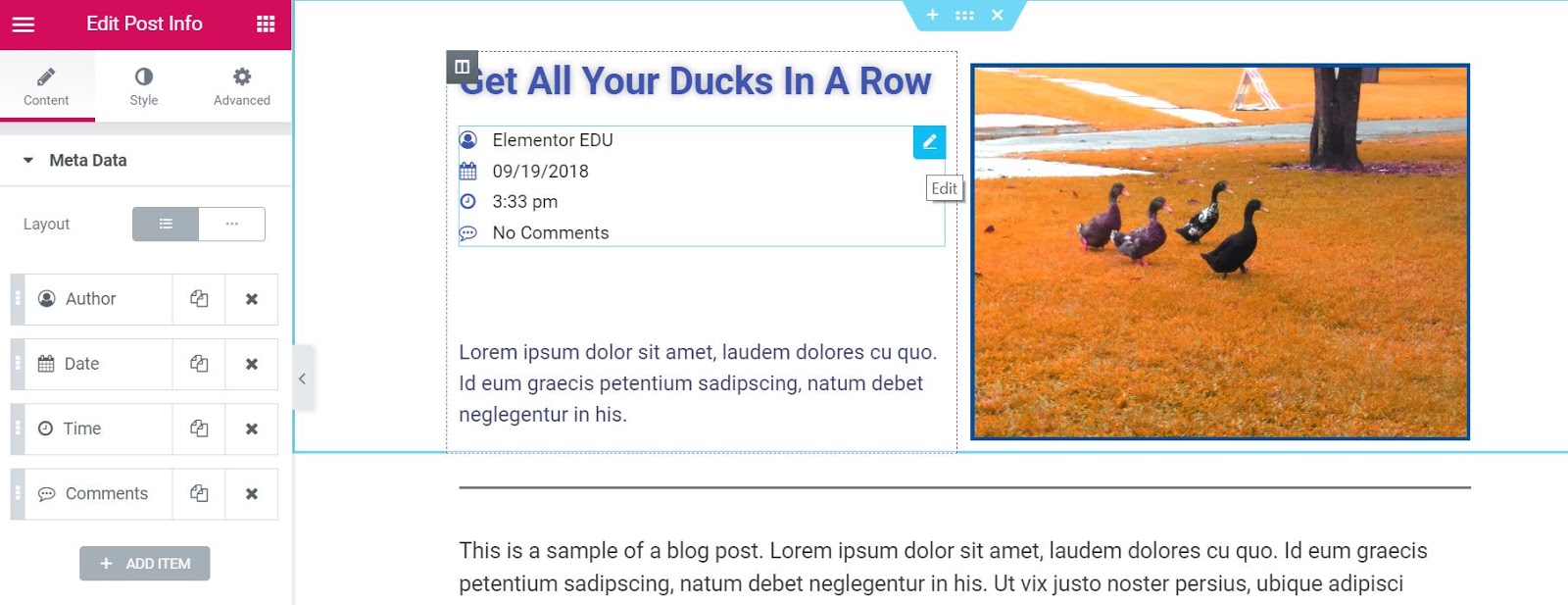
the Publication information widget is a Theme item. Es uno de los widgetsConcepto de Widgets¿Qué son los Widgets?Los Widgets son una serie de pequeños programas que se usan para añadir funciones, simplificar o automatizar aquellas acciones que se lleven a cabo a menudo dentro de una web. Son herramientas adicionales, añadidos que se elaboran con la finalidad de hacer más fácil las labores de mantenimiento o inclusive de generación de contenidos dentro de cualquier sitio de Internet y que no han hecho plus de plantilla de publicación única disponibles que se utiliza para mostrar dinámicamente los metadataLos metadatos son datos estructurados que contienen información sobre una fuente como, por ejemplo, un libro o un documento web. Gracias a los metadatos resulta mucho más fácil hallar la fuente de información dado que contienen datos sobre el título, el autor, la fecha de publicación, la descripción, etc. Se utilizan en librerías pero además para la estadística y la ingeniería de software. Metadatos en WWW Los metadatos se utilizan plus de la publicación actual, como autor, fecha, hora y comentarios.

ContentEl contenido puede ser muy difícil de definir con precisión. Es una definición que se refiere a las declaraciones contenidas en un documento o publicación de cualquier tipo y puede incluir las tecnologías de la información y la comunicación. Esto cubre todos los tipos de medios como imágenes y texto. A parte de esto, en el campo de la optimización de motores de búsqueda, los términos duplicar contenido, contenido único, plus
Metadata
Design: Choose to display the information elements of the publication vertically or horizontally.
The following options are displayed as a list of all available metadata. You can drag and drop them to change their order. Click the Add Item button to add a custom post information meta item to the list.
Tip: Quickly duplicate or remove items by clicking Duplicate or Remove from an item  icon.
icon.
By clicking on each item, you can customize its content and settings, which are:
Author
- Type: Change the item type from Author to Date, Time, Comments, Conditions or Custom
- before: Enter the text to be displayed before the author
- AvatarUn avatar es una imagen gráfica que representa a una persona real. Los avatares se usan como una imagen de alter ego o personaje en mundos virtuales, redes sociales, webs y comunidades. Estos pueden ser iconos personales (los llamados picons) en forma bidimensional o imágenes gráficas tridimensionales tales como figuras cómicas. Información general El término avatar fue acuñado por primera vez por Richard Garriot. Con la creación de "UltimaIV: Quest plus: Select YES to display the author's avatar next to the author's name
- LinkConcepto de Dominio¿Qué es un Enlace?En Internet, un link, además conocido como enlace o hipervínculo, es cualquier texto o imagen que se encuentra en una página web y en la que el usuario puede pulsar o clicar para ser dirigido a otro contenido distinto. Es el principal medio de “desplazamiento” en la red, puesto que se encuentra presente en prácticamente cualquier portal que visites a día de hoy, inclusive en plus: Set YES to link to author's file
- Icon: Select None or select Default to display the default icon, or choose Custom to select a Font Awesome icon
Date
- Type: Change the item type from Date to Author, Time, Comments, Conditions or Custom
- Date format: Select from several date formats or choose Custom to format yours
- before: Enter the text to be displayed before the date
- Link: Set YES to link to the file of that date
- Icon: Select None or select Default to display the default icon, or choose Custom to select a Font Awesome icon
Time
- Type: Change the item type from Time to Author, Date, Comments, Conditions or Custom
- Time format: Select from various time formats or choose Custom to format your own
- before: Enter the text to be displayed before the time
- Icon: Select None or select Default to display the default icon, or choose Custom to select a Font Awesome icon
Comments
- Type: Change the Comments item type to Author, Date, Time, Conditions or Custom
- before: Enter the text to be displayed before the comments
- Custom format: Set to YES to change the wording of No comment, One comment, etc.
- Link: Set YES to link to current post comment form
- Icon: Select None or select Default to display the default icon, or choose Custom to select a Font Awesome icon
Style
List
- Space between: Adjusts the space between each information item in the post
- Alignment: Aligns the list of post info items to the left, center, or right
- Divider- Check this option to add a dividing line between each information item in the publication.
If Divider is set to IN, the following options will be available:
Divider
- Style: Select solid, double, dotted, or dashed
- Weight: Sets the weight of the divisor
- Height: Sets the height of the divider
- Colour: Choose the color of the divider
Icon
- Colour: Choose the color of the post information icon
- Size: Sets the size of the post information icon
Text
- Text script: Sets the amount of space in which the text is indented from the icon
- Text color: Choose the text color
- Typography: Sets the typography options for the text
Read the tutorial showing how to create a unique post template








