
the Elementor Lightbox Open images, galleries, carousels and videos in a 100% mobile lightbox popup
The lightbox feature is enabled by default. You can turn it off by going into your settings and unchecking the checkbox. From any Elementor page or post, click the burger menu in the upper left corner of the Panel de widgetsConcepto de Widgets¿Qué son los Widgets?Los Widgets son una serie de pequeños programas que se usan para añadir funciones, simplificar o automatizar aquellas acciones que se lleven a cabo a menudo dentro de una web. Son herramientas adicionales, añadidos que se elaboran con la finalidad de hacer más fácil las labores de mantenimiento o inclusive de generación de contenidos dentro de cualquier sitio de Internet y que no han hecho plus, then navigate to Site Settings> Settings> Lightbox
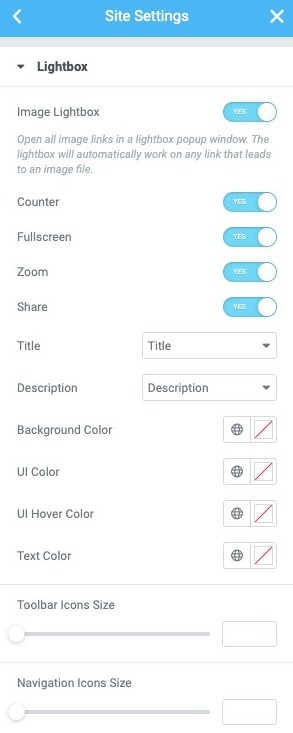
The Global Lightbox tab allows you to adjust the following settings:
- Image Lightbox: Slide the switch to enable or disable the lightbox globally.
- Counter: Only for multiple image galleries. If set to Yes, adds an image count in the upper left corner of the lightbox. For example, if the gallery contains 6 images, the counter will show 1/6, 2/6, etc. to indicate "First of 6 images", "Second of 6 images", and so on.
- Fullscreen: If set to yes, adds a clickable icon to allow the user to open the image in a full screen lightbox.
- Focus: If set to yes, adds a clickable icon to allow the user to zoom in on the image in the lightbox. Once you zoom in on an image, you can pan your view and scroll through different areas of the image.
- Share: If set to yes, Se agregan capacidades para compartir a la caja de luz, lo que permite al usuario compartir la imagen en TwitterTwitter es una red social en Internet que permite a los usuarios difundir información en tiempo real. La característica más notable de twitter solía ser su limitación de tweets a 140 caracteres, pero en septiembre de 2017 se incrementó a 280 caracteres. El único requerimiento para utilizar Twitter es la creación de una cuenta gratuita. Tweets Twitter contiene pequeñas piezas de información llamada tweets. Se puede escribir un máximo de plus, FacebookConcepto de Facebook¿Qué es Facebook?Facebook es una red social hecha por personas y pensada para conectar a personas. Es una de las pioneras de este sector, una de las primeras plataformas que llegaron a Internet con la finalidad de facilitar la comunicación entre usuarios de todas partes, compartir información y contactar con familiares lejanos, amistades o conocidos.Hoy en día, es la red más popular de todo Internet. Nacida en 2004 plus y Pinterest, o descargarla en su computadora.
- Title: Optionally displays a title below the image in the lightbox. Select from None, Title, Subtitle, Altor Description
- Description: Optionally, display a description below the image on the lightbox. Select from None, Title, Subtitle, Altor Description
- Background color: Choose the background color and opacity of the light box.
- Color de la user interface Una interfaz de usuario es un medio por medio de del cual una persona puede controlar un software o hardware específico. Lo ideal es que las interfaces de usuario sean fáciles de utilizar para que la interacción sea lo más instintiva e intuitiva factible. En el caso de los programas informáticos, esto se denomina interfaz gráfica de usuario. Desarrollo y tipos de interfaces de usuario A diferencia de la plus: Choose the User interface color. This affects the navigation of arrows and points of the lightbox, the Close button, etc.
- UI Scroll Color: Choose the UI Scroll Color. This affects the navigation of arrows and points of the lightbox, the Close button, etc. when the user hovers over each one.
Note: All the above functionality responds to mobile devices. Visitors can zoom, open images and videos in full screen and share the images from their mobile phones.
 es un protocolo que permite determinar una conexión segura entre el servidor y el cliente, que no puede ser interceptada por personas no autorizadas. En resumidas cuentas, es la versión segura de el http (Hyper Text Transfer Protocol) Cómo funciona Una conexión HTTP estándar en Internet puede ser fácilmente secuestrada por partes no autorizadas. El propósito de una conexión HTTPS es evitar esto: encriptar<span class="glossaryai-more-link"> <a href="https://rmarketingdigital.com/en/wiki/https/" data-wpel-link="internal">más</a></span></span></span></span></span>://rmarketingdigital.com/wp-content/uploads/2020/09/file-URjwCDAyLZ-6341610.jpg)
Image Lightbox
the Image Lightbox abre todos los enlaces de imágenes en una ventana emergente de caja de luz. La caja de luz funcionará automáticamente en cualquier linkConcepto de Dominio¿Qué es un Enlace?En Internet, un link, además conocido como enlace o hipervínculo, es cualquier texto o imagen que se encuentra en una página web y en la que el usuario puede pulsar o clicar para ser dirigido a otro contenido distinto. Es el principal medio de “desplazamiento” en la red, puesto que se encuentra presente en prácticamente cualquier portal que visites a día de hoy, inclusive en plus que lleve a un archivo de imagen, siempre que la configuración ‘Enlace a’ de la imagen esté establecida en ‘Media file‘.
Once Media file'is chosen, an additional option called'Light box'appear. Here, you will notice that the lightbox function for this image is set to Default, which reflects the state established in the Elementor> Settings> Style section. Optionally, you can change the settings for this image from 'Default' to 'yes'or'No‘.
- Inside the editor, drag and drop the image widget onto the page and choose an image.
- Change the Link to the option of 'Media file'(This must be done for the light box to work.)
- Select the Light box go down to yes
- Preview the lightbox changes by clicking the image








