

Activate the Google custom search you BlogEl término blog se usa para describir un diario virtual en Internet. El autor de un blogger puede publicar posts sobre cualquier tema. Los posts suelen estar presente de forma cronológica. El estilo de redacción de un blog suele ser informal y se escribe en primera persona. No obstante, además son posibles otros estilos, por ejemplo en el caso de los periódicos online, en los que la atención se centra plus es una buena forma de mejorar la user experienceEl término experiencia de usuario (UX) se refiere a la experiencia que un usuario tiene con un producto o servicio. En cuanto a Internet, el término se usa frecuentemente al examinar la experiencia que los usuarios disponen con una web. Esto además puede ser en referencia al uso de un dispositivo smartphone (UX smartphone). Items de la experiencia del usuario La experiencia del usuario y la usabilidad se usan frecuentemente plus. Aprende como activar un motor de search personalized.
This tutorial is part of the tutorial series on:
Cómo integrar las herramientas de Google en tu WordPressWordPress es el software de blogs líder en el mundo, y es concretamente fácil de utilizar y adaptable. Con WordPress, es factible crear con éxito sitios web con la ayuda de funciones ya predefinidas, sin mucho esfuerzo, y para proporcionar contenido como texto, imagen y vídeo. No se requiere conocimiento de HTML. WordPress además facilita la gestión y el mantenimiento de contenidos extensos. Al mismo tiempo de su fácil manejo, plus
How to activate Google custom search in WordPress
It sounds very complex but it is not.
Activate custom search for Google your blog is a four-phase process:
- Sign up for Google custom search
- Configure our engine search personalized
- Set up WP Google Search
- Add the Widget with the search bar.
We get down to work.
Activating custom Google search in WordPress
To have all the searching power of Google on our blog, the first step is sign up for Google Custom Search.
1. How to sign up for Google Custom Search
To sign up for the service Google custom search we must enter the link below:
Once there we will see the typical welcome of Google services where they explain what it is about:
With Google Custom Search, you can add a search box to your home page to make it easier to search your website.
- We click on the button:
Iniciar sesión en Search EngineUn motor de búsqueda es un programa de PC utilizado para buscar datos. Los resultados de la búsqueda se muestran como enlaces en las páginas de resultados de los motores de búsqueda (SERPs), que se pueden usar para conseguir la información deseada. Con la finalidad de establecer la relevancia de una consulta para los datos existentes en el índice, los motores de búsqueda de hoy, trabajan con algoritmos sofisticados. Cómo plus personalizado.
To log in to the custom search engine all we need is an account GmailGmail o Google mail es un servicio de email sin costes proporcionado por el motor de búsqueda Google. Está habilitada en más de 50 idiomas y se financia por medio de promoción comercial. Con Gmail, los mensajes de email se pueden enviar y recibir mediante de una interfaz de navegador en un equipo doméstico. Además se puede usar con smartphones (iOS y Android) o tablets. Existe versión de pago de plus active.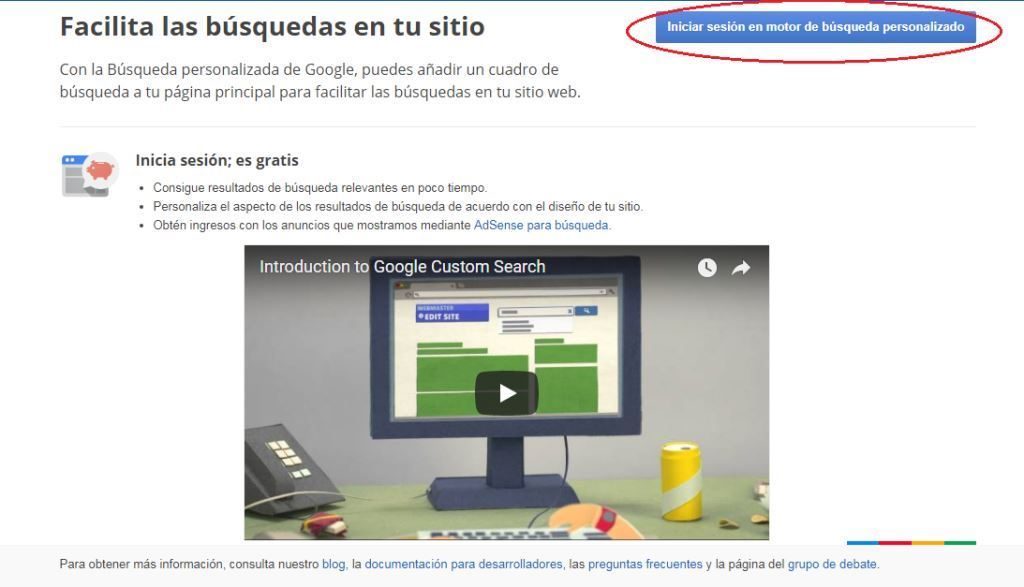
The next step is configure engine search of our website. To do this, we follow the following steps:
2. How to configure our custom search engine
Starting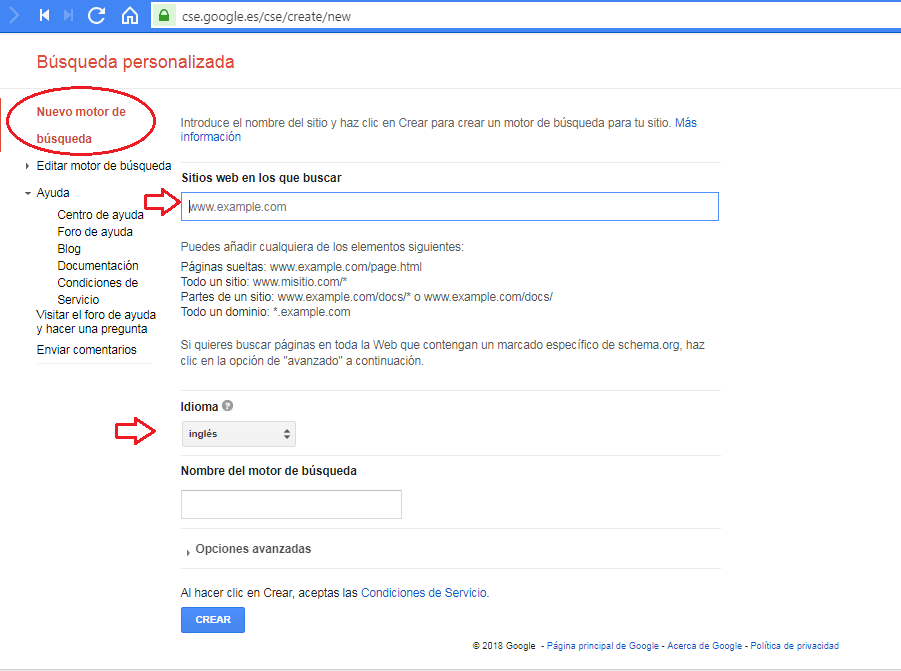
- In the upper left part of the screen we will see a column with options. We will make sure to select the option New search engine.
- There we will enter the following information:
- Address of our website con tres W: direcciondeejemplo.com
- Language of our site.
- The Name que usaremos para nuestro buscador. Por default el sistema crea un nombre basado en el domainUn dominio es una sección de Internet con direcciones que comparten un sufijo común o están bajo el control de una organización o individuo en particular. Está organizado jerárquicamente. Tanto los objetos físicos como los virtuales pueden ser direccionados con el nombre de dominio. Estos objetos pueden ser webs, ordenadores en red o servicios, como impresoras, faxes o servidores de correo. Cada objeto está referenciado por una dirección IP única, plus de nuestra web. Podemos dejarlo tal cual aparece si nos gusta.
Editing our search engine
- Now we must edit our search engine. To do this we press the option Edit search engine. The edit section is divided into four tabs:
- Basics: Where we have the possibility to add the description that best represents our search engine. Keywords, where we can enter terms related to your our website. At the same time we can choose whether we want users to be able to do image searches.
- Advertisements: There we have the possibility to select if we want the results of our search button to show advertising of Google. To do this we must connect our account Google AdSenseConcepto de Google Adsense¿Qué es Google Adsense?Google Adsense es uno de los productos que Google ofrece por medio de de su rama publicitaria. Un sistema de monetización que permite a los editores de los portales online conseguir ingresos económicos en base a sus visitas gracias a la colocación de banners publicitarios con los que se promocionen distintos marcas y/o servicios que pueden guardar o no vinculación con la temática a plus. Who Said Monetization?
- Management: What makes possible add users as administrators who can manage the search engine account except for the advertising section and the creation of new users.
- Advanced Options: In this tab they explain that:
Your custom search engine consists of annotations and context. Annotations specify which sites are included or excluded from your search engine. The context specifies the entire search engine, from the layout to how the annotations should be used.
Note that
The options that your search engine brings up default well they serve to activate the personalized search engine.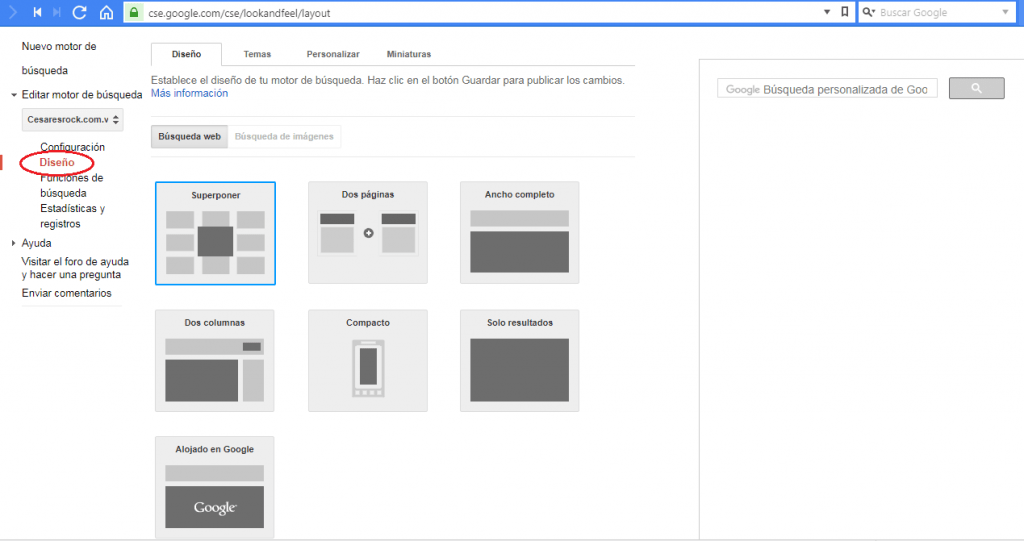
- At the same time we have the option of choose design from our search engine. We choose the design that we like the most and save the changes.
- Important: Once the search engine is configured we must take note of the: Search Engine ID.
Configuration> Finder ID.
3. How to configure WP Google Search
The first. WP Google Search is a pluginConcepto de Plugin¿Qué es un Plugin?Un Plugin es un fragmento o componente de código hecho para ampliar las funciones de un programa o de una herramienta. En el ámbito del marketing digital, especialmente dentro del marketing de contenidos, es algo que se utiliza con mucha frecuencia dentro de entornos como WordPress, puesto que sirven al momento de contar con añadidos que hagan mucho más cómoda y completa la experiencia de plus que nos permitirá instalar el Widget from our custom search on the blog.
We can find it in the official plugin repository of WordPress. To install it, we just have to follow the steps that we show you in detail in this tutorial:
Plugins in WordPress: what they are and how to install them
Once installed it we activate.
I know will create a new tab in our management panel WordPress, in the settings section. You can follow the following route:
Settings> WP Google Search
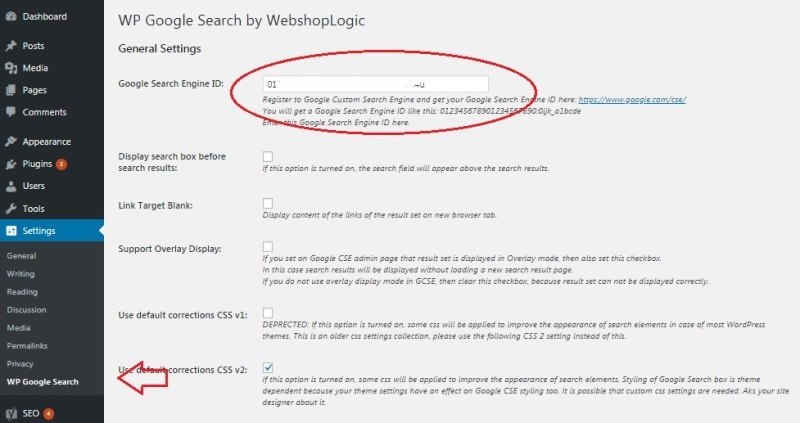
In the settings of the WP Google Search We copy the ID of the Finder.
We keep the changes.
Now we just have to add the Widget on our site that will enable our custom search engine.
4. How to add the Widget with the custom search bar
This is the easiest step. And to complete it we follow the following route:
Apariencia > WidgetsConcepto de Widgets¿Qué son los Widgets?Los Widgets son una serie de pequeños programas que se usan para añadir funciones, simplificar o automatizar aquellas acciones que se lleven a cabo a menudo dentro de una web. Son herramientas adicionales, añadidos que se elaboran con la finalidad de hacer más fácil las labores de mantenimiento o inclusive de generación de contenidos dentro de cualquier sitio de Internet y que no han hecho plus
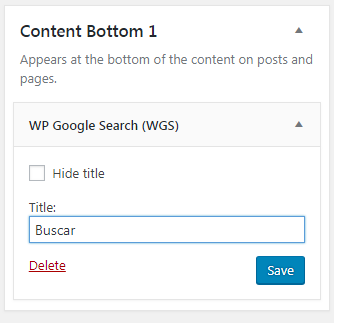
Must drag the WP Google Search (WGS) Widget to the section of our website that we want. We save the changes. And ready.
Now we have a motor Google custom search on our WordPress-based blog.
Remember that if you want to be a expert in Web development and everything related to the world of WordPress and blogs sign up for the best online course and in Spanish from the best content manager: WordPress.org








