
 es un protocolo que permite determinar una conexión segura entre el servidor y el cliente, que no puede ser interceptada por personas no autorizadas. En resumidas cuentas, es la versión segura de el http (Hyper Text Transfer Protocol) Cómo funciona Una conexión HTTP estándar en Internet puede ser fácilmente secuestrada por partes no autorizadas. El propósito de una conexión HTTPS es evitar esto: encriptar<span class="glossaryai-more-link"> <a href="https://rmarketingdigital.com/en/wiki/https/" data-wpel-link="internal">más</a></span></span></span></span></span>://rmarketingdigital.com/wp-content/uploads/2021/04/Windows-10-8644224.png)
<noscriptNoScript es un complemento del navegador para Mozilla Firefox, que impide que se cargue en las páginas web contenido como JavaScript, Flash o iFrames. Su objetivo es incrementar la seguridad durante la navegación y quitar la promoción comercial más molesta al cargar sitios web. El términoNoScript tiene un significado distinto en la programación HTML. Cuando JavaScript está desactivado, la etiqueta <noscript> o </noscript> asegura que el usuario pueda ver el plus>

Windows 10 came from the hand of a improved notification system, un sistema de notificaciones que nos informa de cualquier nuevo mensaje de email, mensajes de aplicaciones de mensajería, de los comentarios que recibimos en nuestra cuenta de TwitterTwitter es una red social en Internet que permite a los usuarios difundir información en tiempo real. La característica más notable de twitter solía ser su limitación de tweets a 140 caracteres, pero en septiembre de 2017 se incrementó a 280 caracteres. El único requerimiento para utilizar Twitter es la creación de una cuenta gratuita. Tweets Twitter contiene pequeñas piezas de información llamada tweets. Se puede escribir un máximo de plus, si nuestro equipo tiene algún problema con el sistema, alarmas …
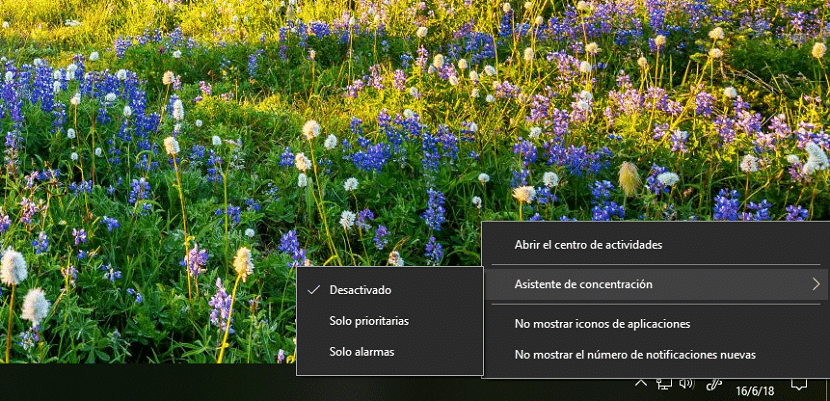
When the notifications start to get very high and we have to focus on the work we are doing, notifications more than an advantage become an obstacle and it always occurs to us to disable them completely. Luckily, from the taskbar, Windows allows us to configure what type of notifications we want to receive thanks to the Concentration Assistant.
The Concentration Assistant allows us to choose which notifications we want to receive on our device. It natively offers us three options, options that satisfy all our needs since we can configure them to suit our needs:
- disabled. This function, activated natively, allows us to receive all notifications from our applications and contacts.
- Priority only. Thanks to this function, we will only be able to receive the applications within a priority list, while the rest will be displayed directly in the Action Center but without showing any notification. We must take into account what applications we want to include in this option, since if we include the most common, this function does not make sense.
- Alarms only. If we activate this function, only alarms that are configured to sound on our equipment will be notified. Any other type of notification will not appear on the screen or be notified through acoustic signals.
How to activate concentration modes
(*10*)
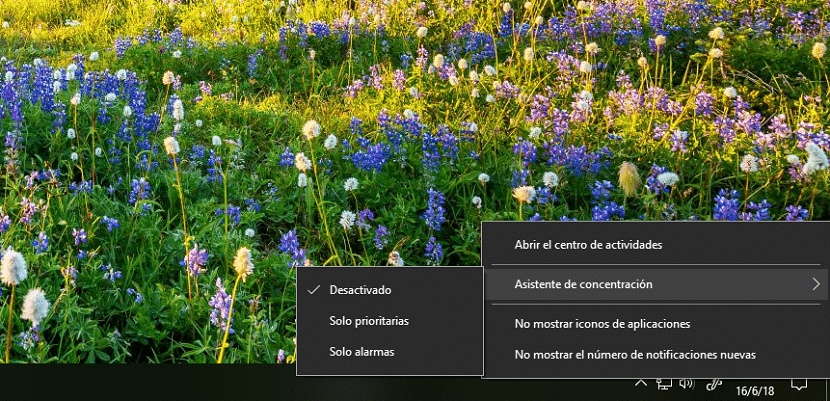
Once we know how the concentration mode works and we have established which are the applications that can disturb, we just have to activate it. For this, we just have to right-click on the icon that represents a message at the end of the taskbar, go to Concentration Assistant and choose which of the three modes is the one we want to activate at that moment.









