
 es un protocolo que permite determinar una conexión segura entre el servidor y el cliente, que no puede ser interceptada por personas no autorizadas. En resumidas cuentas, es la versión segura de el http (Hyper Text Transfer Protocol) Cómo funciona Una conexión HTTP estándar en Internet puede ser fácilmente secuestrada por partes no autorizadas. El propósito de una conexión HTTPS es evitar esto: encriptar<span class="glossaryai-more-link"> <a href="https://rmarketingdigital.com/en/wiki/https/" data-wpel-link="internal">más</a></span></span></span></span></span>://rmarketingdigital.com/wp-content/uploads/2021/04/Windows-10-1293500.jpg)
<noscriptNoScript es un complemento del navegador para Mozilla Firefox, que impide que se cargue en las páginas web contenido como JavaScript, Flash o iFrames. Su objetivo es incrementar la seguridad durante la navegación y quitar la promoción comercial más molesta al cargar sitios web. El términoNoScript tiene un significado distinto en la programación HTML. Cuando JavaScript está desactivado, la etiqueta <noscript> o </noscript> asegura que el usuario pueda ver el plus>

Windows 10 is a very productivity-oriented operating system. That is why we find many functions and tools that help us work in the best way. There are times when we need to have two windows open on the screen at the same time. It is possible that we are working on a text and we have a source or a web portal in the other window.
Working with two windows at the same time is not always easy, because the size often does not fit what we are looking for. Luckily in Windows 10 we can make use of the split screen function. From this dynamic, working with two windows becomes much easier.
Split screen
(*10*)
Thinking about the comfort of the users and that it is easier to work, the ability to split screen in Windows 10. The idea behind this opportunity is very simple. Users should be able to work comfortably if they have a couple of windows open on the screen. So you can have two documents, or a document and a web page, or whatever combination you can think of.
From this dynamic, when using the split screen, what we see is that each half of the screen is occupied by each of these windows. Which will allow us to work comfortably, without having to jump from one to another every few seconds. Thus, if we need to translate a text, or we are writing something using a web portal as a source, this dynamic will be much more comfortable for us. The windows will adjust to the size of the screen at all times.
Therefore, we will not have to adjust the size of them at any time when we use the divided screen in Windows 10. A very convenient feature for users, which will also be able to function in a much more efficient way. It does not matter if you use a laptop or a desktop, the operation and the result of using this function is the same in all cases.

PostConcepto de Post¿Qué es un Post?Un Post es todo aquel contenido, sea post, opinión, noticia u otro género, que un autor publica en un blog. Este puede ser de carácter corporativo o meramente ocioso; pero siempre tiene como meta arrojar información o reflejar una idea, al mismo tiempo de facilitar que los usuarios encuentren la web donde se recoge por medio de de buscadores y demás plataformas online.Generalmente, se han plus relacionado:
How to split the screen in Microsoft Excel
How to use split screen in Windows 10
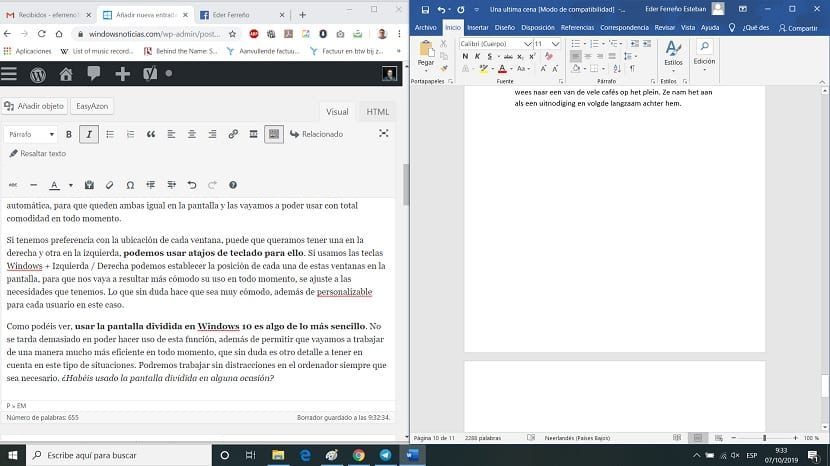

For this particular case, we don't have to do anything special. The only thing it will ask us in Windows 10 is open the two windows specifically que anhelamos tener en pantalla en todo momento, ya sea el browserUn navegador (además: browser) es una herramienta informática que te permite ver documentos y datos y navegar por la red. Los navegadores pueden mostrar distintos tipos de recursos de información; principalmente documentos HTML, a pesar de todo, además son posibles otros tipos de archivos y contenido multimedia, como PDF, JPEG, MPEG, GIF o el lenguaje de meta marcado. A través el uso de complementos especiales y la configuración respectivo, los plus y un documento o la combinación que necesites en tu caso. Abrimos estas ventanas en la computadora.
Then we have to adjust the size of them. Therefore, we reduce the size of each one, we stop occupying the screen, and we make each one occupy half the screen, more or less. When we bring the edges of each window closer to the edges of the screen, Windows 10 will take care of adjusting the size of each one of them automatically, so that both are the same on the screen and we can use them comfortably at all times.
If we have preference with the location of each window, it is possible that we want to have one on the right and one on the left, we can use keyboard shortcuts for this. If we use the Windows + Left / Right keys we can determine the position of each of these windows on the screen, so that its use is more comfortable for us at all times, it adjusts to the needs we have. Which undoubtedly makes it very comfortable, at the same time customizable for each user in this case.
Related post:
All alternatives to take screenshots in Windows 10
As you can see, using split screen in Windows 10 is very simple. It does not take long to be able to use this function, at the same time allowing us to go to work in a much more efficient way at all times, which is undoubtedly another detail to take into account in this type of situation. We can work without distractions on the computer as long as it is necessary. Have you ever used split screen?









