
 es un protocolo que permite determinar una conexión segura entre el servidor y el cliente, que no puede ser interceptada por personas no autorizadas. En resumidas cuentas, es la versión segura de el http (Hyper Text Transfer Protocol) Cómo funciona Una conexión HTTP estándar en Internet puede ser fácilmente secuestrada por partes no autorizadas. El propósito de una conexión HTTPS es evitar esto: encriptar<span class="glossaryai-more-link"> <a href="https://rmarketingdigital.com/en/wiki/https/" data-wpel-link="internal">más</a></span></span></span></span></span>://rmarketingdigital.com/wp-content/uploads/2021/04/informacion-adaptador-tarjeta-wifi-7139384.png)
<noscriptNoScript es un complemento del navegador para Mozilla Firefox, que impide que se cargue en las páginas web contenido como JavaScript, Flash o iFrames. Su objetivo es incrementar la seguridad durante la navegación y quitar la promoción comercial más molesta al cargar sitios web. El términoNoScript tiene un significado distinto en la programación HTML. Cuando JavaScript está desactivado, la etiqueta <noscript> o </noscript> asegura que el usuario pueda ver el plus>

If our computer has begun to show problems with the Internet connection, first of all we must begin to rule out what may be, one by one, the causes of the problem. If all the devices in our home responsible for managing the Internet signal in our home work great with other devices, most likely the problem is with our computer.
The best way to find out is by making use of the RJ-45 connection, the network cable of your life (since winning the battle with coaxial cable). If when connecting a network cable directly from the router, our computer connects perfectly to the Internet, the problem is with our wireless network card.
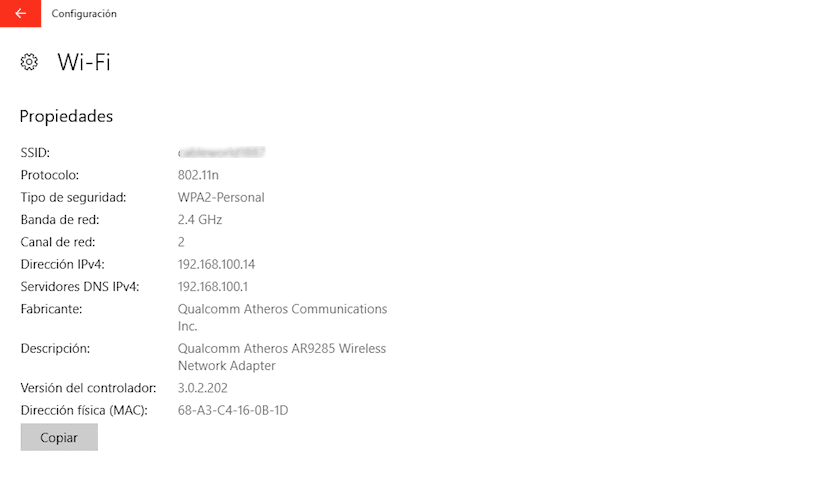
If it is a desktop computer, we just have to go to a computer store and order a new one that meets the requirements we are looking for. But if it is a laptop, we will have to know what the specifications of the adapter are, to be able to find the same model to replace it. For this we must enter the characteristics of the Wifi card by following these steps.
What is the manufacturer of my Wifi card?
- We address the alternatives first windows configuration, which we can enter through the Start button and clicking on the cogwheel in the left column.
- Next we go to the menu Network and Internet.
- Once we have accessed the Network and Internet menu, we go to the left column and click on the option Wifi
- In the right column, the name of the Wi-Fi connection to which we are connected will be displayed, if it is the case, and just below Show available networks, we will find the option Propiedades de hardwareEn informática, el término hardware se refiere a cualquier componente de un sistema informático que sea un objeto físico real, al contrario que el software que existe en forma digital. Esto incluye el disco duro y las unidades incorporadas, es decir, todos los componentes que son "duros", de ahí su nombre. Desarrollo El desarrollo del hardware informático comienza con la creación de los primeros ordenadores y tiene su verdadero origen plus.
- Clicking on Hardware Properties will show all the information of the Wifi card that we have installed on our computer, whether it is laptop or desktop.









