
In this guide we are going to introduce you to one of the best tools to mejorar el rendimiento de tu BlogEl término blog se usa para describir un diario virtual en Internet. El autor de un blogger puede publicar posts sobre cualquier tema. Los posts suelen estar presente de forma cronológica. El estilo de redacción de un blog suele ser informal y se escribe en primera persona. No obstante, además son posibles otros estilos, por ejemplo en el caso de los periódicos online, en los que la atención se centra plus in WordPressWordPress es el software de blogs líder en el mundo, y es concretamente fácil de utilizar y adaptable. Con WordPress, es factible crear con éxito sitios web con la ayuda de funciones ya predefinidas, sin mucho esfuerzo, y para proporcionar contenido como texto, imagen y vídeo. No se requiere conocimiento de HTML. WordPress además facilita la gestión y el mantenimiento de contenidos extensos. Al mismo tiempo de su fácil manejo, plus. The pluginConcepto de Plugin¿Qué es un Plugin?Un Plugin es un fragmento o componente de código hecho para ampliar las funciones de un programa o de una herramienta. En el ámbito del marketing digital, especialmente dentro del marketing de contenidos, es algo que se utiliza con mucha frecuencia dentro de entornos como WordPress, puesto que sirven al momento de contar con añadidos que hagan mucho más cómoda y completa la experiencia de plus WP Super Cache It is one of the most powerful and you can download it for free. You will learn what it is for, how to install and configure it.
Qué es el cacheUn caché es un tipo de memoria auxiliar de la que se puede recuperar a alta velocidad con una capacidad de almacenamiento relativamente pequeña. Se encuentra entre la unidad central de procesamiento (CPU) y la memoria principal. Ayuda a evitar el acceso al disco duro o los recálculos complejos almacenando temporalmente ciertos datos y haciéndolos disponibles rápidamente cuando sea necesario. El caché almacena una copia de la petición actual y plus
To understand the relevance of this plugin you must know its execution area. This is where the term cache comes in. In a general and direct way, the cache is a way to deliver information that is already stored and does not require requesting it from the source of origin. WordPress is light but sometimes it gets a bit heavy and a plugin in this category is good for it.
What is the WP Super Caché plugin for
Ahora bien, esta herramienta ejecuta una copia de cada página creada en tu blog, de esa manera sirve esa copia a cada visitante que llegue. Esto es beneficioso puesto que en lugar de pedir la información requerida al serverLos servidores son ordenadores centrales y potentes dentro del campo de la tecnología de la información que procesan y proporcionan software y archivos en una red. Desde el punto de vista de un cliente, varios ordenadores en una red pueden ponerse en contacto con el servidor central para conseguir la información solicitada. En la arquitectura cliente-servidor, el servidor puede ser un software que proporciona un servicio y se ejecuta en plus, entrega una que ya tienen almacenada y evitas cargar tu hosting.
This tool is equivalent to several plugins that exist in the WordPress.org library. But you will soon discover that it is simpler and more effective. At the same time, it makes it possible to configure it according to the requirements of each website.
Install and configure WP Super Caché
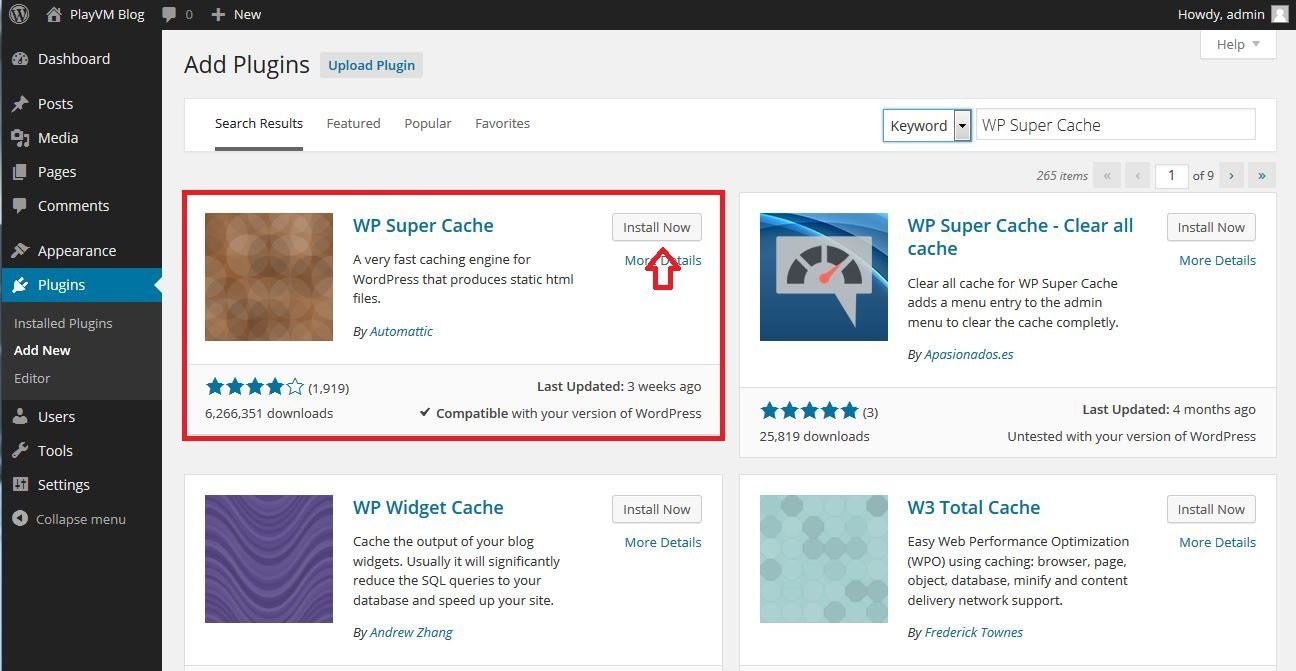
Step No. 1: start by going to your WordPress panel, while there go to Plugins> Add new. Search for WP Super Caché and click install and then you will only have to activate.
Step No. 2: it's time to configure. Go to Settings> WP Super Cache, open it and you will find a panel with several options, to activate it you must click on Caching On and then click on Save Changes.
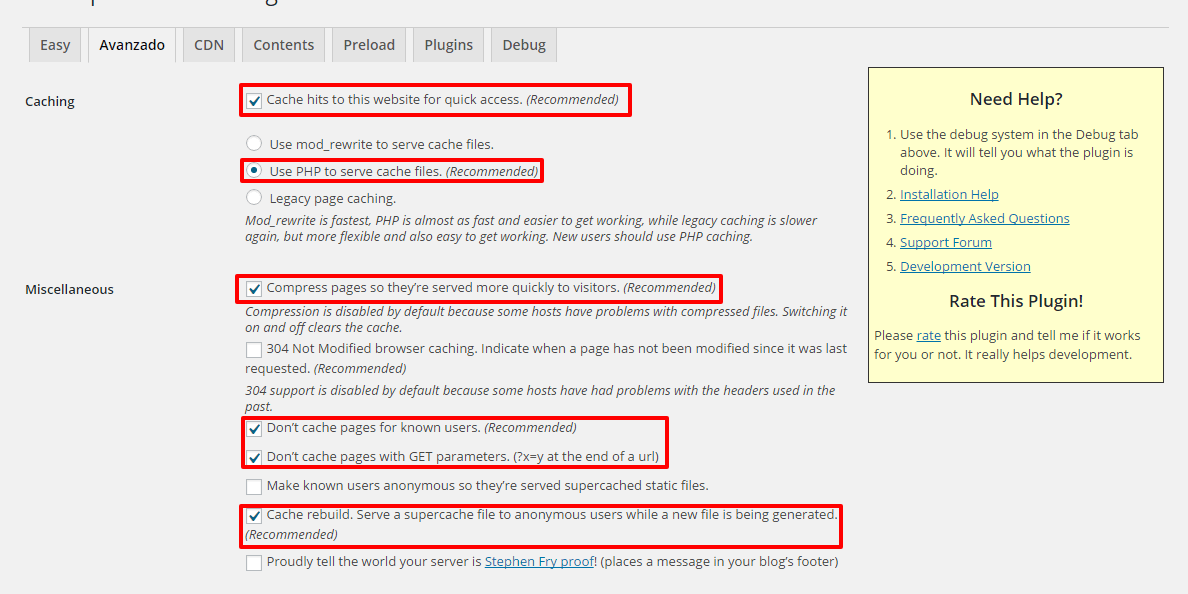
Step No. 3: immediately go to the Advanced tab and activate the following boxes.
- Cache hits to this website for quick Access: you will activate an improvement from its root configuration.
- Use mod_rewrite to serve cache files: this way you will use the server module to compress.
- Compress pages so they're served more quickly to visitors - ideal for each page to be compressed.
- Don't cache pages for known users: it will prevent you from caching user generated pages.
- Cache rebuild. Serve a supercache file to anonymous users while a new file is being gnerated: to display some files while generating others.
- Mobile device support: this is already activated, but if not, do it so that there is compatibility with mobiles.
Checking these options saves the changes in Update status. When you do this step las reglas se guardarán en el htaccessLos archivos htaccess son archivos de configuración específicos de directorios para servidores web compatibles con NCSA, como el servidor web Apache. Todos los ajustes en el archivo.htaccess se aplican al directorio donde se almacenó el archivo, así como a todos los subdirectorios, y entran en vigor inmediatamente. No hace falta reiniciar el servidor. Distintos usos del archivo.htaccess Los usos típicos del archivo.htaccess son la reescritura y redirección de URLs, la plus. Right afterwards you will see the appearance of a green window. This means that the configuration was successful.
Step No. 4: go to tab CDN. To use it you must register in a CDN service. Here we recommend activating it and leaving the options that come by default. To modify any other option you must understand well what you want to apply so as not to cause internal problems.
Step No. 5: go to the Content tab. In it you will see all the web pages that have been cached. If after activating the plugin you make any changes, immediately go to this tab and then to Regenerate cache starts, that way the data is updated.
We suggest not modifying the other tabs since they have a very good default configuration. We hope this guide on how to install and configure the WP Super Cache plugin.








