
 es un protocolo que permite determinar una conexión segura entre el servidor y el cliente, que no puede ser interceptada por personas no autorizadas. En resumidas cuentas, es la versión segura de el http (Hyper Text Transfer Protocol) Cómo funciona Una conexión HTTP estándar en Internet puede ser fácilmente secuestrada por partes no autorizadas. El propósito de una conexión HTTPS es evitar esto: encriptar<span class="glossaryai-more-link"> <a href="https://rmarketingdigital.com/en/wiki/https/" data-wpel-link="internal">más</a></span></span></span></span></span>://rmarketingdigital.com/wp-content/uploads/2021/04/Microsoft-PowerPoint-8766396.png)
<noscriptNoScript es un complemento del navegador para Mozilla Firefox, que impide que se cargue en las páginas web contenido como JavaScript, Flash o iFrames. Su objetivo es incrementar la seguridad durante la navegación y quitar la promoción comercial más molesta al cargar sitios web. El términoNoScript tiene un significado distinto en la programación HTML. Cuando JavaScript está desactivado, la etiqueta <noscript> o </noscript> asegura que el usuario pueda ver el plus>

When creating a Microsoft PowerPoint presentation, as with Word and Excel, one of the biggest dangers is that due to a failure of the softwareConcepto de Software¿Qué es el Software y cuál es su función?Un Software es la parte lógica, o más bien el soporte lógico, de cualquier sistema de tipo informático. Sea un PC, un teléfono teléfono celular o inclusive una tablet, es todo aquel programa que se ejecuta en él gracias a la coordinación de la parte física, es decir, el hardware, para llevar adelante alguna tarea concretamente o un recopilatorio de plus o a modo de ejemplo un corte de energía, no se puede seguir editando dicha presentación y los cambios no se guardan.
This is quite a serious obstacle, especially in cases where the changes in question have not been saved for too long. And, for this same reason, a while ago from the Microsoft team you have decided to integrate the autosave function, thanks to which it is possible to keep the changes you make up to date in the cloud in your PowerPoint presentations practically at the same time they are made.
How to enable autosave in Microsoft PowerPoint to avoid losing changes
As we already mentioned, what this function does is upload a copy of your PowerPoint presentation to OneDrive, Microsoft's online storage service. And thus, as long as you have an internet connection on your computer, changes will be synced automatically, with the opportunity to even access their updated versions from other devices.
PostConcepto de Post¿Qué es un Post?Un Post es todo aquel contenido, sea post, opinión, noticia u otro género, que un autor publica en un blog. Este puede ser de carácter corporativo o meramente ocioso; pero siempre tiene como meta arrojar información o reflejar una idea, al mismo tiempo de facilitar que los usuarios encuentren la web donde se recoge por medio de de buscadores y demás plataformas online.Generalmente, se han plus relacionado:
How to redisplay the toolbar in Microsoft PowerPoint
From this dynamic, to activate the autosave you will need have a linked Microsoft account (personal, business or educational) to Office, while having an updated version of Microsoft Office 365 taking into account that it consists of a not too old version. If you meet these requirements, go to any PowerPoint presentation that you should see, in the upper left corner, a slider button to activate automatic saving.
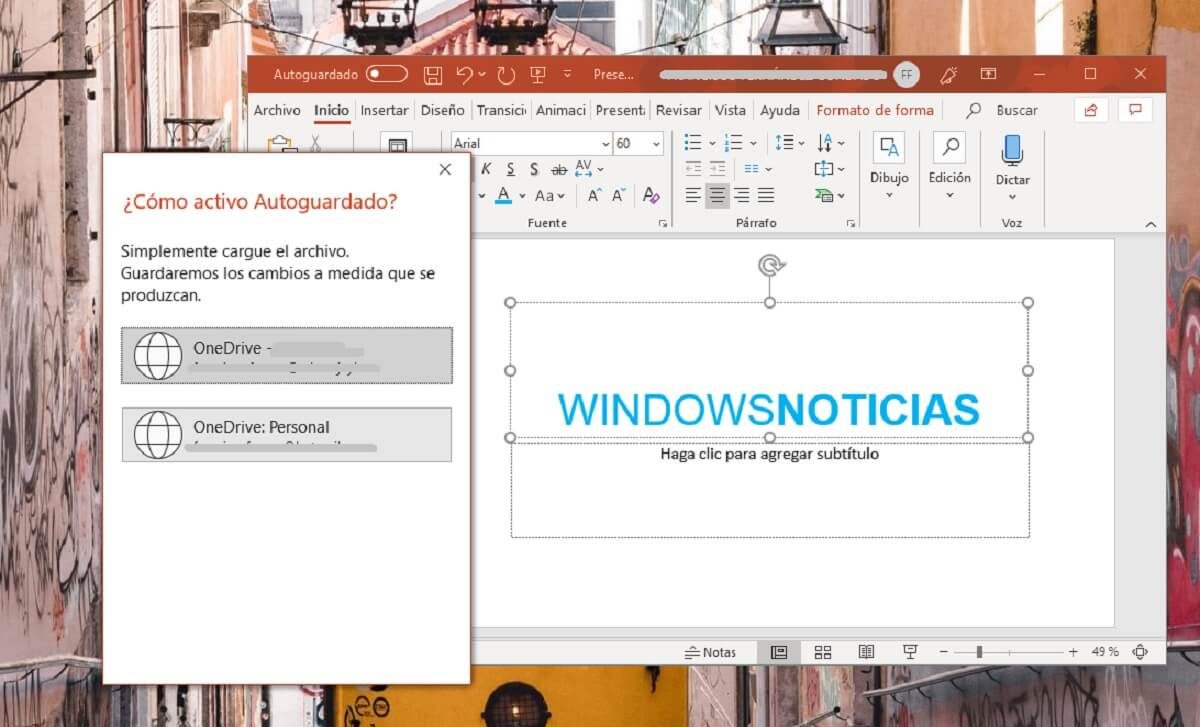

Clicking on this button should bring up a fairly simple box, in which you should select which Microsoft account you want to upload the presentation if you have several, and then there will only be choose the name of the file and the folder in which you prefer to save it. As soon as you select both, you will only have to wait a few seconds for the initial load of the document to take place and, then, as you make changes in your PowerPoint, you will see that at the top it appears that they are saved in OneDrive.









