Muchas veces, tanto en JavaScriptJavaScript es un lenguaje de programación que funciona en el lado del cliente y con el que las webs pueden ser más funcionales. Incorporación en código HTML El código JavaScript puede ser incrustado en las páginas HTML, para que adquieran funcionalidad. Existen varias opciones. Puede estar entre las etiquetas <SCRIPT> y </SCRIPT>, puede estar contenido en un archivo externo, puede ser un parámetro de las etiquetas HTML, y puede estar plus como en otros lenguajes de programmingConcepto de Programación¿Qué es la Programación?La Programación es el procedimiento al que se recurre para crear algún tipo de aplicación o software, para materializar un concepto o proyecto que requiere de la utilización de un lenguaje informático para poder llevarse a cabo. Es algo que está absolutamente ligado a la figura del programador, y que cada vez está cobrando más relevancia dentro del mundo del marketing.Decimos que tanto esta figura plus necesitamos realizar diferentes acciones basadas en una condición.
There is an if statement for that and also the conditional (ternary) operator for evaluating the conditional, which we will refer to as the "question mark" operator. ? For simplicity.
The "if" statement
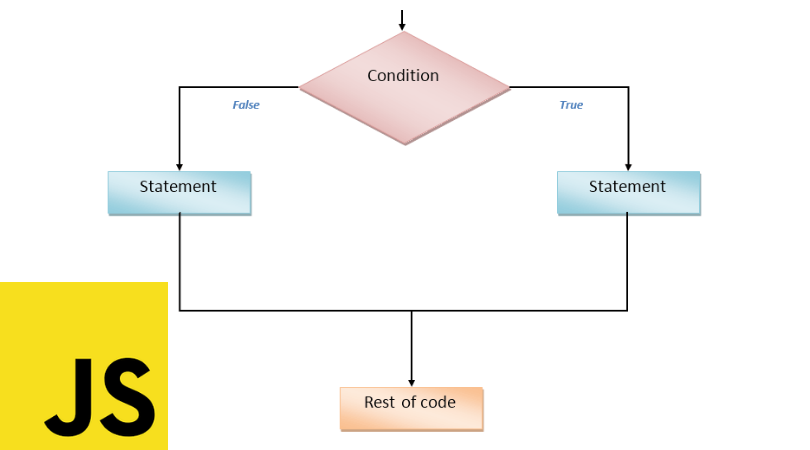
The if statement gets a condition, evaluates it, and if the result is true (true), execute the code, and if not, no.
For example:
// What year was the ECMAScript-2015 specification published? ' // Answer: in 2015 let year = 2015; if (year == 2015) alert ('It was published in the year 2015');
In the example above, the condition is a simple equality check: years == 2015, but it can be much more complex.
If there is more than one statement to execute, we have to wrap our code block in braces:
if (years == 2015) {alert ("You are correct!"); alert ("You are extremely smart!"); }
It is recommended to wrap the code block if with keys {} each time, even if there is only one statement. That improves readability.
ConversionConversión es una acción precisa que lleva a cabo un usuario al visitar un portal web. Algunas formas clásica de conversión son, por ejemplo, una compra, una descarga o una suscripción a la newsletter. Un parte del SEO o del Marketing Online es la Optimización de Ratio de Conversión (CRO). En el Marketing de afiliación se usa para la conversión de los editores. Información general Hay diferentes indicadores para medir plus booleana
The if statement (…) evaluates the expression in parentheses and converts it to the Boolean type.
- A number 0, an empty string »«, null, undefined, and NaN is converted to false. That is why they are called "false" values.
- Other values become true, so they are called "truth."
So the code under this condition would never run:
if (0) {// 0 is false ...} ... And inside this condition - it always works: if (1) {// 1 is true ...}
We can also pass a pre-evaluated Boolean value to if, as here:
let cond = (years == 2015); // equality evaluates to true or false if (cond) {...}
The "else" clause
The declaration if can contain a block Else optional. It runs when the condition is wrong.
For example:
let age = 16; if (age> = 18) {alert ('You are already of legal age'); } else {alert ('you are a minor'); // Since age is equal to 16, the if block will be completely skipped and immediately jump to the else}
Various conditions: "yes no"
Sometimes we would like to test several variants of a condition. There is a clause else if For that.
For example:
let year = prompt ('In what year was the ECMAScript-2015 specification published?', ''); if (year <2015) {alert ('Too soon ...'); } else if (year> 2015) {alert ('Too late'); } else {alert ('Exact!'); }
In the above code JavaScript first checks year <2015. If it is false, it goes to the next condition year> 2015 and otherwise it shows the last alert.
There may be more else if blocks. The ending else is optional.
Ternary operator '?'
Sometimes we need to assign a variable depending on a condition.
For example:
let AccessAllowed; let age = prompt ('How old are you?', ''); if (age> 18) {AllowedAccess = true; } else {AllowedAccess = false; } alert (AccessAllowed);
The operator called "ternary" or "question mark" allows us to do it in a shorter and easier way.
The operator is represented by a question mark ?. The formal term "ternary" means that the operator has three operands. Actually, it is the only operator in JavaScript that has so many.
The syntax is:
let result = condition? value1: value2
Is evaluated condition, if it is true then value1 is returned, otherwise - value2.
For example:
let AllowedAccess = (age> 18)? true: false;
Technically, we can omit parentheses around age> 18. The question mark operator has a low priority. Runs after comparison >, so we will do the same:
// the relational operator "age> 18" executes first anyway // (no need to wrap it in parentheses) let AllowedAccess = age> 18? true: false;
But the parentheses make the code more readable, so it is recommended to use them.
Keep in mind:
In the example above, it is possible to evade the question mark operator, because the comparison itself returns true / false:
// the same let AllowedAccess = age> 18;
Multiple '?'
A sequence of question mark operators? allows to return a value that depends on more than one condition.
For example:
let age = prompt ('age?', 18); let message = (age <3)? 'Hi chic@!' : (age <18)? 'Hello!' : (age <100)? 'Greetings !' : 'What an unusual age! '; alert (message);
It can be difficult at first to understand what is going on. But after a more detailed analysis, we can see that it is just an ordinary sequence of tests.
The first question mark checks if age <3.
If true - it returns 'Hello, chic @!', Otherwise - it goes after the colon ":" and looks for age <18.
If that's true, it returns 'Hello!', Otherwise, it goes after the colon ':' and checks for age <100.
If that's true, it returns 'Greetings!', Otherwise, it goes after the last colon ':' and returns 'What an unusual age!'.
Here I show you the same logic using if..else:
if (age <3) {message = 'Hello, chic @!'; } else if (age <18) {message = 'Hello!'; } else if (age <100) {message = 'Greetings!'; } else {message = 'What an unusual age!'; }
Non-traditional use of '?'
Sometimes the question mark? is used as a replacement for if:
let company = prompt ('What company created JavaScript?', ''); (company == 'Netscape')? alert ('Correct!'): alert ('Incorrect.');
Depending on the condition company == 'Netscape', the first or the second back? they run and display the alert.
We don't assign a result to a variable here. The idea is to run different code depending on the condition.
Using the question mark operator in this way is not recommended.
The notation appears to be shorter than if, which appeals to some programmers. But it is less readable.
Here is the same if code for comparison:
let company = prompt ('What company created JavaScript?', ''); if (company == 'Netscape') {alert ('Correct!'); } else {alert ('Incorrect.'); }
Our eyes scan the code vertically. Constructs that span multiple lines are easier to understand than a long horizontal instruction set.
The idea of a question mark? is to return one or the other value depending on the condition. Please use it for exactly that.