We often have the need to perform similar actions many times in a row. For example, when we need to output goods from a list one after other. Or just run the same code for each number from 1 to 10.
Loops are a way of repeating the same part of code multiple times.
The "while" loop
The while loop has the following syntax:
while (condition) {// code // the so-called "loop body"}
While the condition be true (true), the code runs from the loop body.
For example, the loop below produces i while (while) i <3:
let i = 0; while (i <3) {// returns 0, then 1, then 2 alert (i); i ++; }
A single execution of the body of the loop is called an iteration. The loop in the example above does three iterations.
If there were not i ++ en el ejemplo anterior, el bucle se repetiría (en teoría) para siempre. En la práctica, el browserUn navegador (además: browser) es una herramienta informática que te permite ver documentos y datos y navegar por la red. Los navegadores pueden mostrar distintos tipos de recursos de información; principalmente documentos HTML, a pesar de todo, además son posibles otros tipos de archivos y contenido multimedia, como PDF, JPEG, MPEG, GIF o el lenguaje de meta marcado. A través el uso de complementos especiales y la configuración respectivo, los plus proporciona formas de detener dichos bucles, y para el JavaScriptJavaScript es un lenguaje de programación que funciona en el lado del cliente y con el que las webs pueden ser más funcionales. Incorporación en código HTML El código JavaScript puede ser incrustado en las páginas HTML, para que adquieran funcionalidad. Existen varias opciones. Puede estar entre las etiquetas <SCRIPT> y </SCRIPT>, puede estar contenido en un archivo externo, puede ser un parámetro de las etiquetas HTML, y puede estar plus del lado del serverLos servidores son ordenadores centrales y potentes dentro del campo de la tecnología de la información que procesan y proporcionan software y archivos en una red. Desde el punto de vista de un cliente, varios ordenadores en una red pueden ponerse en contacto con el servidor central para conseguir la información solicitada. En la arquitectura cliente-servidor, el servidor puede ser un software que proporciona un servicio y se ejecuta en plus podemos detener el proceso.
Any expression or variable can be a loop condition, not just a comparison. They are evaluated and converted to a Boolean by while.
For example, the shortest way to write while (i! = 0) could be while (i):
let i = 3; while (i) {// when i is 0, the condition is false, and the loop stops alert (i); i--; }
No supports required for a single line body
If the body of the loop has only one declaration, we can omit the brackets {…}:
let i = 3; while (i) alert (i--);
The "do ... while" or Do ... While loop
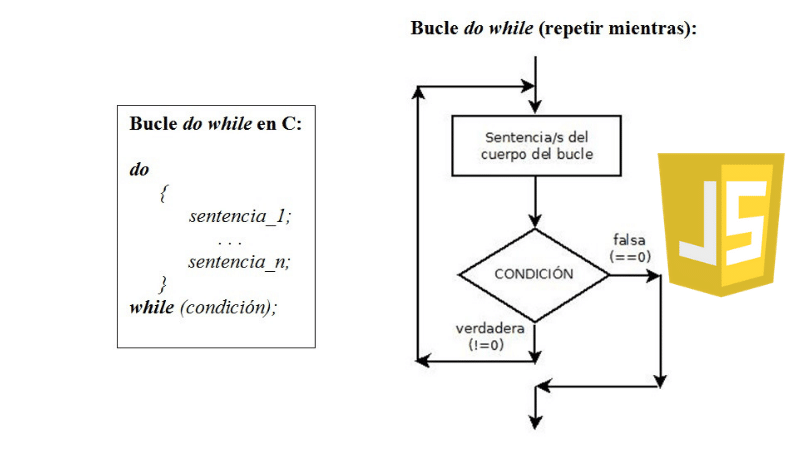
The condition check can be moved under the body of the loop using the syntax do ... while:
do {// Body of the loop} while (condition);
The loop will execute the body first, then it will check the condition, and while it is true, it will execute it over and over again.
For example:
let i = 0; do {alert (i); i ++; } while (i <3);
This form of syntax is rarely used, except when you want the body of the loop to run at least once, regardless of whether the condition is true. The other way is generally preferred: while (…) {…}.
The For or "for" loop
The for loop is the most used.
Does it look like this:
for (Start; Condition; Step) {// ... Body of the loop ...}
Let's learn the meaning of these parts by example. The loop below runs for alert (i) from 0 to i (but not including) 3:
for (let i = 0; i <3; i ++) {// return 0, then 1, then 2 alert (i); }
Let's examine the declaration for part by part:
Parts
- Start i = 0 It runs once upon entering the loop.
- Condition i <3 Checked before each loop iteration, if it fails the loop stops.
- Step i ++ It runs after the body in every iteration, but before the condition check.
- Loop body, alert (i) Run over and over as long as the condition is true.
The algorithmUn algoritmo es un procedimiento o conjunto de reglas a seguir en los cálculos u otras operaciones de resolución de problemas, fundamentalmente por un PC. Apps Un ejemplo de la vida cotidiana es una receta para hornear un pastel. Siguiendo los pasos de la receta se obtiene el pastel deseado al final. Otras apps conocidas son la búsqueda y clasificación. ¿Cómo se puede hallar un canal de televisión de la plus de bucle general funciona así:
Start of execution
→ (if the condition → running body and running step)
→ (if the condition → running body and running step)
→ (if the condition → running body and running step)
→ ...
If you are not familiar with loops, it might help to go back to the example and reproduce how it is performed step by step on a piece of paper.
This is exactly what happens in our case:
// for (let i = 0; i <3; i ++) alert (i) // start of execution let i = 0 // if the condition → run body and run step if (i <3) {alert ( i); i ++} // if the condition → run body and run step if (i <3) {alert (i); i ++} // if the condition → run body and run step if (i <3) {alert (i); i ++} // ... ends, because now i == 3
Online variable declaration
Here the variable «counter» i it is declared right in the loop. That is called addeclaration of variable «online». Such variables are visible only within the loop.
for (let i = 0; i <3; i ++) {alert (i); // 0, 1, 2} alert (i); // error, no such variable
Instead of defining a variable, we can use an existing one:
let i = 0; for (i = 0; i <3; i ++) {// use an existing variable alert (i); // 0, 1, 2} alert (i); // 3, visible, but declared outside the loop
Skipping parts
Any part of the for can be omitted.
For example, we can omit beginning if we don't need to do anything at the beginning of the cycle.
As here:
let i = 0; // we have already declared and assigned for (; i <3; i ++) {// no need to "start" alert (i); // 0, 1, 2}
We can also delete the step part:
let i = 0; for (; i <3;) {alert (i ++); }
The loop was made identical to while (i <3).
We can remove everything, thus creating an infinite loop:
for (;;) {// repeats infinite times}
Note that the colon; they must be present in the for, otherwise it would be a syntax error.
Breaking the loop
Normally the loop exits when the condition becomes false.
But we can force the exit at any time.
There is a special break directive for that.
For example, the following loop prompts the user for a series of numbers, but "breaks" when no number is entered:
let sum = 0; while (true) {let value = + prompt ("enter a number", ''); if (! value) break; // (*) sum + = value; } alert ('Sum:' + sum);
The break directive fires on the (*) line if the user enters an empty line or cancels the entry. Stops the loop immediately, passing control to the first line after the loop. Namely alert.
The combination "infinite loop + break as needed" is ideal for situations where the condition needs to be checked not at the beginning / end of the loop, but in the middle, or even at various places on the body.
Continue to the next iteration.
Directive continue is a "lighter version" of break. It doesn't stop the entire loop. Instead, it stops the current iteration and forces the loop to start a new one (if the condition allows it).
We can use it if we are done with the current iteration and would like to move on to the next one.
The following loop is used continue to generate only odd values:
for (let i = 0; i <10; i ++) {// if true, skip the remaining part of the body if (i % 2 == 0) continue; alert (i); // 1, then 3, 5, 7, 9}
For even values of i the continue directive is used, the execution of the body is stopped, passing control to the next iteration of for (with the next number). So alert is only called for odd values.
The continue directive helps decrease the level of nesting.
A loop showing odd values might look like this:
for (let i = 0; i <10; i ++) {if (i % 2) {alert (i); }}
From a technical point of view, it is identical to the previous example. Surely, we can just wrap the code in the if block instead of continue.