
 es un protocolo que permite determinar una conexión segura entre el servidor y el cliente, que no puede ser interceptada por personas no autorizadas. En resumidas cuentas, es la versión segura de el http (Hyper Text Transfer Protocol) Cómo funciona Una conexión HTTP estándar en Internet puede ser fácilmente secuestrada por partes no autorizadas. El propósito de una conexión HTTPS es evitar esto: encriptar<span class="glossaryai-more-link"> <a href="https://rmarketingdigital.com/en/wiki/https/" data-wpel-link="internal">más</a></span></span></span></span></span>://rmarketingdigital.com/wp-content/uploads/2021/04/instalar-aplicaciones-disco-duro-externo-1-6687659.png)
<noscriptNoScript es un complemento del navegador para Mozilla Firefox, que impide que se cargue en las páginas web contenido como JavaScript, Flash o iFrames. Su objetivo es incrementar la seguridad durante la navegación y quitar la promoción comercial más molesta al cargar sitios web. El términoNoScript tiene un significado distinto en la programación HTML. Cuando JavaScript está desactivado, la etiqueta <noscript> o </noscript> asegura que el usuario pueda ver el plus>

The opportunities that Windows 10 offers us, compared to previous versions, are very great. But if we talk about the Pro version, the number of functions and features increases considerably. One of the most striking is the one that enables us move apps to an external hard drive, once installed.
This function is very equivalent to that offered by the Android operating system for mobile devices. This function of Windows 10 has the same limitations as Android, so we are going to find different applications that we will never be able to transfer to an external disk. To avoid this little problem, we can configure Windows so that future applications are installed on an external drive.
Installing applications on an external disk allows us to always have free space on our main hard drive, so that the administration of the operating system is always the most optimal. For change the installation drive for future applications which we plan to install on Windows 10, we will proceed as follows.
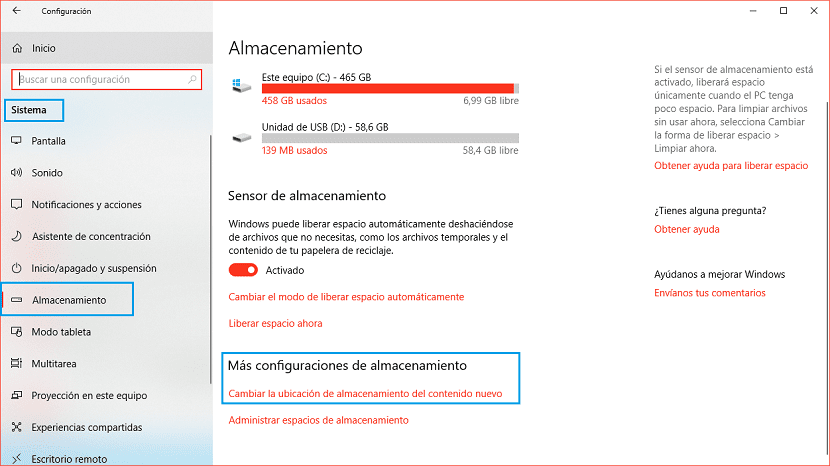
First we must have access to the Windows settings, through the keyboard shortcut Windows key + io or through the start menu by clicking on the cogwheel shown on the left side of the menu. Then click System> Applications.
(*10*)
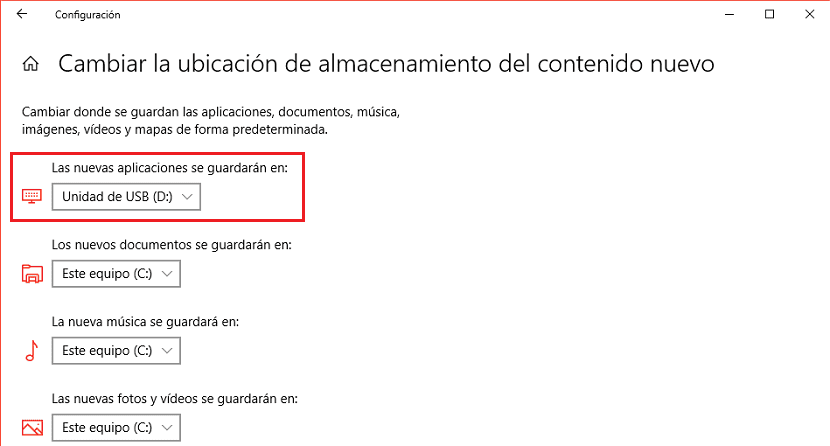
Within the Storage option, we scroll to the bottom right, to the More storage settings section. Then click on the first available option: Cambie la ubicación de almacenamiento para contentsEl contenido puede ser muy difícil de definir con precisión. Es una definición que se refiere a las declaraciones contenidas en un documento o publicación de cualquier tipo y puede incluir las tecnologías de la información y la comunicación. Esto cubre todos los tipos de medios como imágenes y texto. A parte de esto, en el campo de la optimización de motores de búsqueda, los términos duplicar contenido, contenido único, plus new. Next, we must click on The new applications will be saved in: and click on the drive connected to our computer with NTFS format where they will be installed.
This change, just it will affect all the applications that we install after this change, it will not affect those that are already installed in our equipment. If we want to move the applications that are installed on our computer, in Windows News we also have a tutorial prepared where we explain how to do it.









