
Blocking IP addresses is a good security measure for our blogs. In this course tutorial WordPressWordPress es el software de blogs líder en el mundo, y es concretamente fácil de utilizar y adaptable. Con WordPress, es factible crear con éxito sitios web con la ayuda de funciones ya predefinidas, sin mucho esfuerzo, y para proporcionar contenido como texto, imagen y vídeo. No se requiere conocimiento de HTML. WordPress además facilita la gestión y el mantenimiento de contenidos extensos. Al mismo tiempo de su fácil manejo, plus.com we teach you to block IP addresses on WordPress.
What is an IP?
If you are a blogger or webmasterEl término webmaster fue utilizado por primera vez por Tim Berners-Lee, el inventor de la World Wide Web, en su documento "Style Guide for Online Hypertext". La palabra se compone de las palabras inglesas "web", forma corta de World Wide Web y "master". En los primeros días de la WWW, a principios de la década de 1990, el término se usaba principalmente como un nombre profesional para las personas que disponen plus and you are fully immersed in the world of WordPress and webs, it is very safe you already know that it is a IP adressDirección de Protocolo de Internet, la dirección IP es una dirección de red que se puede asignar a un dispositivo en una red sólo una vez. Esto hace falta para que los paquetes de datos puedan direccionarse y entregarse correctamente. Una dirección IP es el identificador único de un PC que establece su ubicación en Internet. Muestra qué proveedor se está usando. La dirección IP de 32 bits (además llamada plus.
In case you need to remember it, we will refresh your memory.
IP refers to: Internet Protocol or Internet protocol.
The IP is the number by which a computer or connection is identified. It is then you ID number In the net. And that of your visitors.
An example of IP would be:
"199.154.1.7"
Without the quotes.
And they are all structured in four number blocks:
111.222.3.4
These four blocks of numbers are separated from each other by dots. All IPs follow this hierarchy, without exception.
Why is IP important?
Having said the above about the Internet Protocol, bien puedes pensar que lo de las direcciones IPs de tus visitantes no te beneficia como bloggerEl término blogger tiene dos significados. Se puede usar para referirse a la plataforma gratuita de hosting de blogs de Google, blogger.com, o a una persona que opera su propio blog. Blogger (persona) Los bloggers (o blogueros) son personas que gestionan un blog y hacen público regularmente "artículos" en ellos, ya sea por razones privadas o comerciales. Los mensajes de los bloggers suelen caracterizarse por el hecho de que muchas plus o webmaster. Pero te equivocas.
It is precisely by means of the IP adress that we can do against attacks of spamEl spam puede ser definido como mensajes no deseados que se envían principalmente por vía electrónica. Se entregan sin haber sido solicitados por el destinatario, y suele ser promoción comercial. Existen varios tipos de spam, como el spam de email o el spam en las redes sociales. Los afectados pueden acudir a los puntos de contacto designados y buscar ayuda. Detección de spam El spam tiene muchas características por las plus massiveandDDoS attacks.
A subsection:
Los ataques DDoS son aquellos quese basan en grandes volúmenes de datos dirigidos a una dirección determinada. Con el fin de colapsar la capacidad del serverLos servidores son ordenadores centrales y potentes dentro del campo de la tecnología de la información que procesan y proporcionan software y archivos en una red. Desde el punto de vista de un cliente, varios ordenadores en una red pueden ponerse en contacto con el servidor central para conseguir la información solicitada. En la arquitectura cliente-servidor, el servidor puede ser un software que proporciona un servicio y se ejecuta en plus.
That footprint left by your visitors with the identification number will allow us to restrict their access.
Come on, you can always put the poster of: se reserves the right of admission. And keep unwanted visitors at bay.
Yes, we already know that you want to take action. Therefore, without further delay we will show you the different ways to:
Block IP addresses in WordPress
Block IP addresses in WordPress with .htaccess
For restrict access to certain IP addresses without using plugins we can create or modify the file.htaccessLos archivos htaccess son archivos de configuración específicos de directorios para servidores web compatibles con NCSA, como el servidor web Apache. Todos los ajustes en el archivo.htaccess se aplican al directorio donde se almacenó el archivo, así como a todos los subdirectorios, y entran en vigor inmediatamente. No hace falta reiniciar el servidor. Distintos usos del archivo.htaccess Los usos típicos del archivo.htaccess son la reescritura y redirección de URLs, la plus.
Para hacer esto recomendamos usar un editor de texto dedicado a tareas de programmingConcepto de Programación¿Qué es la Programación?La Programación es el procedimiento al que se recurre para crear algún tipo de aplicación o software, para materializar un concepto o proyecto que requiere de la utilización de un lenguaje informático para poder llevarse a cabo. Es algo que está absolutamente ligado a la figura del programador, y que cada vez está cobrando más relevancia dentro del mundo del marketing.Decimos que tanto esta figura plus. Nosotros usamos Notepad ++.
With the .htaccess file we have several possibilities.
- Block a specific user:
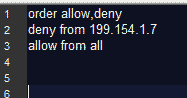
This is done when we type in the full IP address of the user in question. In this case:199.154.1.7
- Block multiple users from a common address:
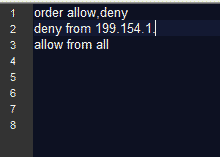
In this case, all users who share the range 199.154.1they will be banned from your site.
Although there is still a way to mass ban more effective. And it is without a doubt one of our favorites. It is that sometimes it happens that many attackers from spam they use Dynamic IP (IP addresses that they change constantly). Or one VPN connection that masks the registration number of that netizen. So it is difficult to specify them from a specific IP.
To carry out this blocking from .htaccess we need to locate the host name from malicious users.
order allow, deny
deny from hostingdespammers.com
allow from all
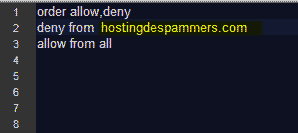
With this trick you can already face certain attacks from Specific IPs. It is recommended for nostalgic lovers of manual tasks. And when it consists of spam attacks that do not exceed a dozen IP addresses.
Bloquear direcciones IP en WordPress desde cPanelConcepto de Cpanel¿Qué es Cpanel?Cpanel, cuyo nombre es el acrónimo de Control Panel, es un panel de control que se usa para gestionar servidores de hosting web. Un entramado de herramientas con el que automatizar procesos, administrar datos y cuentas por medio de de una interfaz gráfica que se aloja además en la web.Una de sus principales características es que cuenta con distintos aspectos y menús accesibles en función del plus
This method, very much in line with the first, will allow you to block addresses IP of determined users. It is a method cash when you have good specified the IP address of the attacker or the attackers. Although in this case it should be rather few. Because it is impossible to add hundreds of addresses IP manually.
To carry it out we log in to our cPanel.And follow the following route:
Security> IP Blocker
Once the IP blocker is located, we add the IP or IP addresses that we need ban from our site. When you have all the unwanted IPs in the list, click Add.
Be careful not to include your own IP address, that of one of your collaborators or that of visitors more faithful.
Block IP addresses from WordPress dashboard without plugins
Yes, it is possible to restrict access to the IP addresses you want (and that you have specified) from the WordPress dashboard without plugins.
The procedure is simple.
We will obtain the IP from the comments left on our site.
If every time a user comments on our site, at the same time as a comment loaded with affection (or spam) they leave us their IP address.
And we can block it by following this route:
Settings> Comments
Once there we find the option:
Comments blacklist
In it we will add all the IPs of annoying users.
An additional piece of information: these users can browse our website but will no longer be able to leave comments.
Block IP addresses in WordPress with plugins
We like plugins. And on repeated occasions we have recommended a few that can well help you in the task of blocking IP.
Plugins dedicated to security tasks such as:
- Jetpack
- WordFence
- Akismet
We use and recommend WordFence to cope with attacks. Although in the WordPress plugin repository there are other tools (free and paid) that at the same time fulfill this function.
Did you like the tutorial and tips for blocking IP addresses? Do you want to keep learning? Well, what are you waiting for to sign up for the best online course in Spanish in WordPress and become an expert.








