
 es un protocolo que permite determinar una conexión segura entre el servidor y el cliente, que no puede ser interceptada por personas no autorizadas. En resumidas cuentas, es la versión segura de el http (Hyper Text Transfer Protocol) Cómo funciona Una conexión HTTP estándar en Internet puede ser fácilmente secuestrada por partes no autorizadas. El propósito de una conexión HTTPS es evitar esto: encriptar<span class="glossaryai-more-link"> <a href="https://rmarketingdigital.com/en/wiki/https/" data-wpel-link="internal">más</a></span></span></span></span></span>://rmarketingdigital.com/wp-content/uploads/2021/04/Ordenador-portC3A1til-8000775.png)
<noscriptNoScript es un complemento del navegador para Mozilla Firefox, que impide que se cargue en las páginas web contenido como JavaScript, Flash o iFrames. Su objetivo es incrementar la seguridad durante la navegación y quitar la promoción comercial más molesta al cargar sitios web. El términoNoScript tiene un significado distinto en la programación HTML. Cuando JavaScript está desactivado, la etiqueta <noscript> o </noscript> asegura que el usuario pueda ver el plus>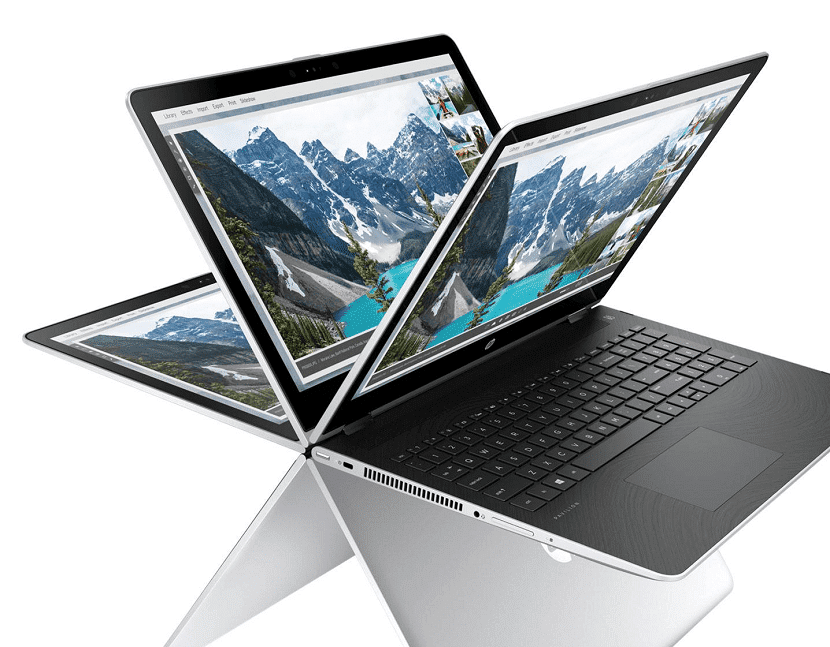
Bluetooth is an increasingly common feature on laptops. Even though not all the models that we can buy today have this functionality. Therefore, if we already have one or are thinking of buying a PC, it is good to know if it has these characteristics or not. If you already have a laptop, there are several alternatives to verify this.
Here we show you the ways in which it is feasible check whether your laptop has bluetooth or not. All of them very simple, but they will be of great advantage in these cases, when you want to know if this feature is present in it or not.
Bluetooth icon
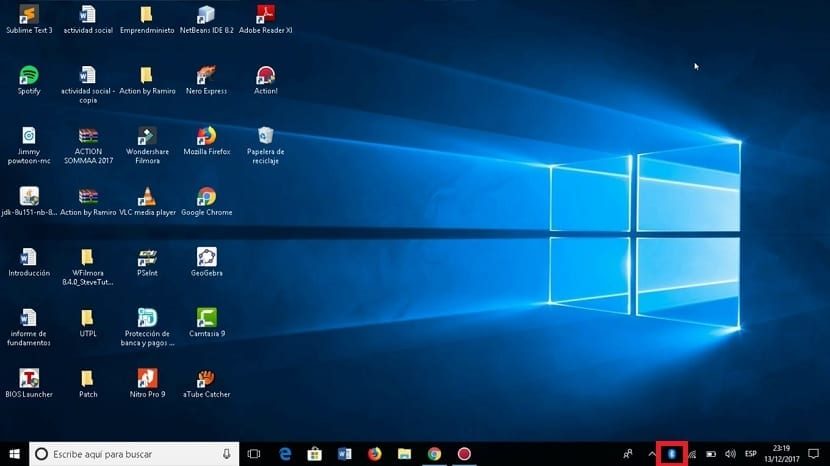
One of the simplest ways that exist is check if the Bluetooth icon is on the taskbar. On the right side, next to the time, volume and WiFi icons, this icon generally also appears. Therefore, if we go to the taskbar and see that it is not there, it is possible that the computer does not have this feature in it. What is a detail to pay attention to.
That this icon is not displayed on the taskbar. it is not a guarantee of the 100%. It may happen that it does not appear or only appears when Bluetooth is activated. So it's a quick way, but it doesn't mean forever that we don't have it.
PostConcepto de Post¿Qué es un Post?Un Post es todo aquel contenido, sea post, opinión, noticia u otro género, que un autor publica en un blog. Este puede ser de carácter corporativo o meramente ocioso; pero siempre tiene como meta arrojar información o reflejar una idea, al mismo tiempo de facilitar que los usuarios encuentren la web donde se recoge por medio de de buscadores y demás plataformas online.Generalmente, se han plus relacionado:
How to rename a Bluetooth device in Windows 10
Device administrator
A method that we can use in all versions of Windows. Use device manager It is a way to know if our laptop has Bluetooth or not. Depending on the version of the operating system you have installed, the way to get there is different. Even though you can use in all cases the search engine from the start menu to access it. Then a new window will open on the screen, where we have said administrator.
En él veremos que hay una lista con todo el hardwareEn informática, el término hardware se refiere a cualquier componente de un sistema informático que sea un objeto físico real, al contrario que el software que existe en forma digital. Esto incluye el disco duro y las unidades incorporadas, es decir, todos los componentes que son "duros", de ahí su nombre. Desarrollo El desarrollo del hardware informático comienza con la creación de los primeros ordenadores y tiene su verdadero origen plus que tenemos instalado en nuestro portátil. Entonces, ¿qué tenemos que hacer? is to search for Bluetooth in this list. If we find it in the list, it means that our equipment has this feature, so we can use it. It may happen that it is not seen directly, but if we click on the network adapters chapter we will see that we have this function or not. If in neither of the two cases it is seen, then we do not have.
Check the specifications of the laptop

Another simple method that we can always resort to, either in a laptop that we have or if we are thinking of buying a new one. Check the specifications of that laptop. It will let us know if you have Bluetooth or not.. At the same time, today we have many different ways to access this information, so it is very simple for this purpose.
We can use the papers from the laptop itself., where we usually have all the information about it, and from this dynamic to know if it has Bluetooth or not. At the same time, we can always go to the website of the manufacturer or brand of this equipment. In this circumstance, we only have to go to its web portal and have access to the model we have, where we will be able to see its complete specifications. Therefore, in a matter of minutes, we will be able to access this information.
Related post:
How to Add Devices and Fix Bluetooth Issues in Windows 10
At the same time, we cannot forget that we can google. Many pages write about notebooks, so we can find their specifications easily with a couple of clicks. Thus, we will have access to this information and we will know if the laptop we have or the one we think we buy has Bluetooth or not. If we are thinking of buying one, we can also consult the web pages of the stores in which it is for sale, they usually also have this information.









