
 es un protocolo que permite determinar una conexión segura entre el servidor y el cliente, que no puede ser interceptada por personas no autorizadas. En resumidas cuentas, es la versión segura de el http (Hyper Text Transfer Protocol) Cómo funciona Una conexión HTTP estándar en Internet puede ser fácilmente secuestrada por partes no autorizadas. El propósito de una conexión HTTPS es evitar esto: encriptar<span class="glossaryai-more-link"> <a href="https://rmarketingdigital.com/en/wiki/https/" data-wpel-link="internal">más</a></span></span></span></span></span>://rmarketingdigital.com/wp-content/uploads/2021/04/Microsoft-Office-para-Android-9204680.jpg)
<noscriptNoScript es un complemento del navegador para Mozilla Firefox, que impide que se cargue en las páginas web contenido como JavaScript, Flash o iFrames. Su objetivo es incrementar la seguridad durante la navegación y quitar la promoción comercial más molesta al cargar sitios web. El términoNoScript tiene un significado distinto en la programación HTML. Cuando JavaScript está desactivado, la etiqueta <noscript> o </noscript> asegura que el usuario pueda ver el plus>

Microsoft Office is the best-known office suite in the world, as well as the most widely used. Over the years, new versions have been arriving, incorporating new functions. Even though the latest versions are quite similar to each other. This causes that there are users who do not know with certainty the version that they are using in their equipment.
What can we do in that case? Can easily check the version of Microsoft Office that we have installed on our PC. So we get out of doubts and we know wonderfully which version we have at the moment. Checking this is very easy.
First of all we have to open a document with Microsoft Office programs. It can be a document in Word or a spreadsheet in Excel. It doesn't matter which of the two we open. Once decided, we open a document in the chosen program.
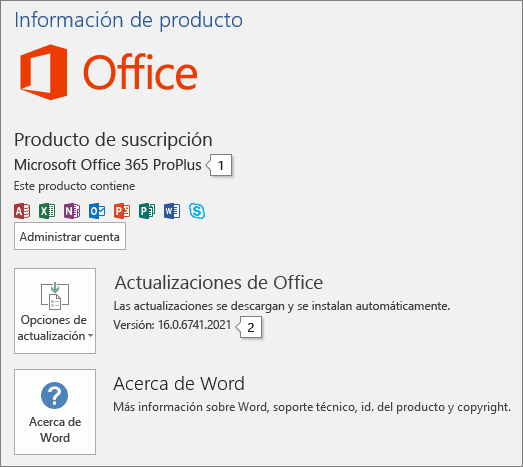

Within the document in question, in the upper left part of the screen we click on file. We will get a list and we will have to choose account or help in this list we get. Then it will send us to a new screen where we see several options. On this screen we focus on the Product Information chapter, which we can see in the image.
PostConcepto de Post¿Qué es un Post?Un Post es todo aquel contenido, sea post, opinión, noticia u otro género, que un autor publica en un blog. Este puede ser de carácter corporativo o meramente ocioso; pero siempre tiene como meta arrojar información o reflejar una idea, al mismo tiempo de facilitar que los usuarios encuentren la web donde se recoge por medio de de buscadores y demás plataformas online.Generalmente, se han plus relacionado:
How to install MTP drivers in Windows 10
In product information we already have several data about Microsoft Office. We will be able to see the name of the product, which already tells us the version we have. Or Office 365 in any of its versions or a normal license. At the same time, below we get the version. To know more we can click About Word. There we have more information available about it.
So, with a couple of simple steps Now we will get to know the version of Microsoft Office that we have installed on our computer. Information that can be useful to us on repeated occasions. Especially if we have an obstacle with the office suite.









