
 es un protocolo que permite determinar una conexión segura entre el servidor y el cliente, que no puede ser interceptada por personas no autorizadas. En resumidas cuentas, es la versión segura de el http (Hyper Text Transfer Protocol) Cómo funciona Una conexión HTTP estándar en Internet puede ser fácilmente secuestrada por partes no autorizadas. El propósito de una conexión HTTPS es evitar esto: encriptar<span class="glossaryai-more-link"> <a href="https://rmarketingdigital.com/en/wiki/https/" data-wpel-link="internal">más</a></span></span></span></span></span>://rmarketingdigital.com/wp-content/uploads/2021/04/como-vaciar-papelera-windows-10-4177606.jpg)
<noscriptNoScript es un complemento del navegador para Mozilla Firefox, que impide que se cargue en las páginas web contenido como JavaScript, Flash o iFrames. Su objetivo es incrementar la seguridad durante la navegación y quitar la promoción comercial más molesta al cargar sitios web. El términoNoScript tiene un significado distinto en la programación HTML. Cuando JavaScript está desactivado, la etiqueta <noscript> o </noscript> asegura que el usuario pueda ver el plus>

Although the arrival of Windows 10 has been a complete revision of what we have enjoyed so far in the Windows interface, many are still users who prefer not to use the desktop as the usual place to save the files and documents that we usually have. use. , so the cleaner the desktop, the better, the better. The recycle bin is the only item that is still available on the desktop after Windows 10 installation completes, an element that aesthetically more than one user may not like and want to make it disappear.
Like the rest of the aesthetic modifications that we can make in Windows 10, this procedure is very easy and you do not need great computer knowledge to carry out this procedure. Again to be able to make this modification let's go to the Personalization section, from where we can customize practically any element of our Windows 10 computer, whether visual or operational.
Once we are in the Personalization section, we go to the Themes section and then to Desktop Icon Settings. Then a window will appear where all the items that we can show or hide on our desktop will be shown Windows 10 and where we are: Computer, User Files, Network, Recycle Bin and Control Panel.
To prevent the recycle bin from showing up on the desktop of our Windows 10 computer, we just have to uncheck the icon that indicates itFrom this dynamic, the trash can no longer appear on our desktop, offering us the clean interface we are looking for.
Remove the recycle bin from the desktop
(*10*)
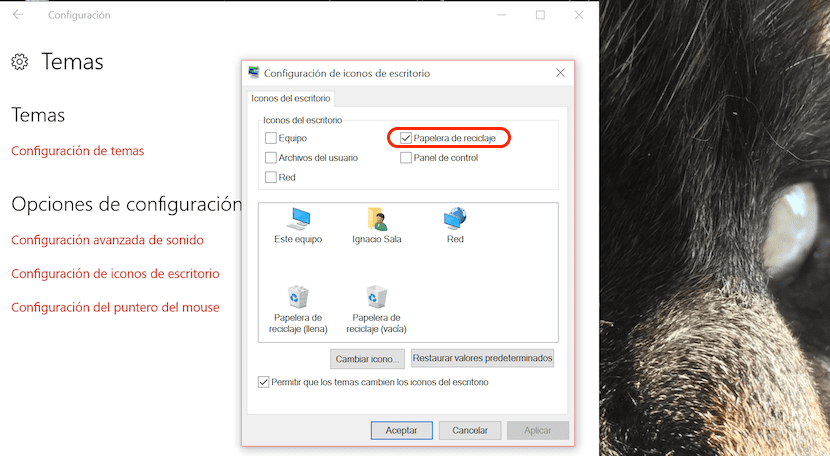
- Home> Settings
- Personalization> Themes
- Desktop Icon Settings> Uncheck Recycle Bin.
Through these options we can also download or check the boxes Computer, Network, User files and Control Panel so that they appear on the desktop of our Windows 10 computer.









