

 es un protocolo que permite determinar una conexión segura entre el servidor y el cliente, que no puede ser interceptada por personas no autorizadas. En resumidas cuentas, es la versión segura de el http (Hyper Text Transfer Protocol) Cómo funciona Una conexión HTTP estándar en Internet puede ser fácilmente secuestrada por partes no autorizadas. El propósito de una conexión HTTPS es evitar esto: encriptar<span class="glossaryai-more-link"> <a href="https://rmarketingdigital.com/en/wiki/https/" data-wpel-link="internal">más</a></span></span></span></span></span>://rmarketingdigital.com/wp-content/uploads/2021/04/documentos-word-6485123.jpg)
<noscriptNoScript es un complemento del navegador para Mozilla Firefox, que impide que se cargue en las páginas web contenido como JavaScript, Flash o iFrames. Su objetivo es incrementar la seguridad durante la navegación y quitar la promoción comercial más molesta al cargar sitios web. El términoNoScript tiene un significado distinto en la programación HTML. Cuando JavaScript está desactivado, la etiqueta <noscript> o </noscript> asegura que el usuario pueda ver el plus>

There is no doubt that Microsoft Word is one of the most used programs today when creating, viewing and editing text documents. It is one of the most complete processors today, the main reason for its popularity in the market.
And, as a good word processor, A rule could not be missing, by which you can better understand the measurements, choose the position of the tabs and a long list of possible utilities.. Despite everything, depending on the type of PC you have, it is possible that in the latest versions you have noticed that, by default, the rule is not displayed in Microsoft Word, but you should not worry about it since the solution is very simple.
This is how you can make the ruler display in Microsoft Word
As we already mentioned, in this case the solution to the problem that the rule does not appear in Microsoft Word is quite simple, and of course you will not need to install any third-party duration or anything like that since the rule is still there at all times, only that it is possible that you have accidentally hidden it or that, on the contrary, in your version it is shown by default.
With this in mind, for the ruler to be displayed, you must first enter the Word document you want and then in the tabs at the top, choose the option «View». In conclusion, you just have to look at the "Show" section, where you should be able to check or uncheck the option called «Rule» depending on whether you want to hide or show it.
PostConcepto de Post¿Qué es un Post?Un Post es todo aquel contenido, sea post, opinión, noticia u otro género, que un autor publica en un blog. Este puede ser de carácter corporativo o meramente ocioso; pero siempre tiene como meta arrojar información o reflejar una idea, al mismo tiempo de facilitar que los usuarios encuentren la web donde se recoge por medio de de buscadores y demás plataformas online.Generalmente, se han plus relacionado:
Avoid layout flaws by flipping pages like this in Microsoft Word documents
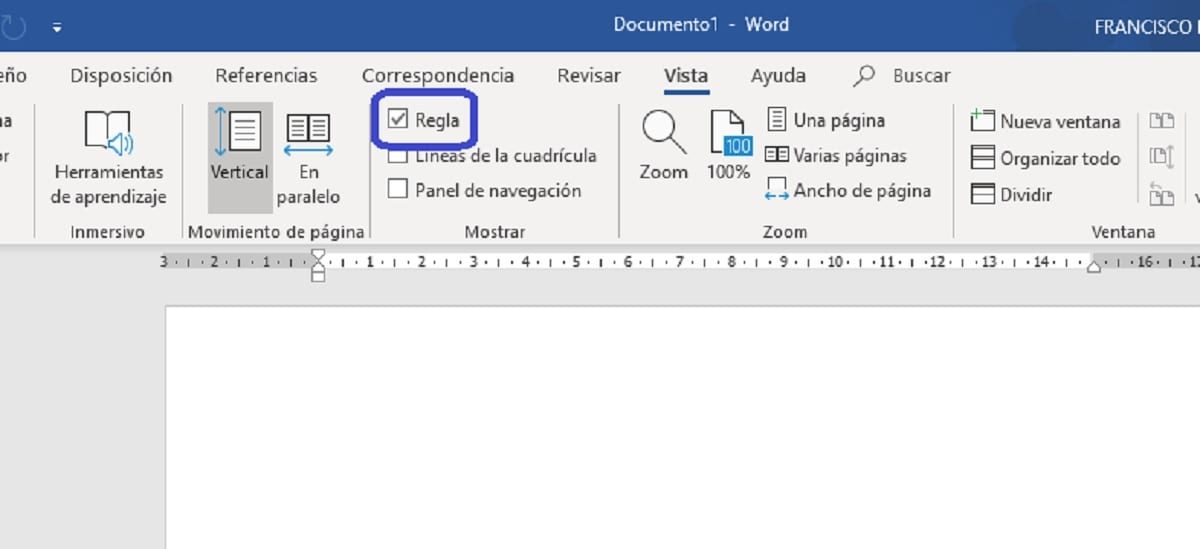

In this way, you can see how the complete ruler is displayed, keeping all functions that until now could be of great advantage in some cases, such as when customizing the tabulations or to interpret the measurements in reality.









