
 es un protocolo que permite determinar una conexión segura entre el servidor y el cliente, que no puede ser interceptada por personas no autorizadas. En resumidas cuentas, es la versión segura de el http (Hyper Text Transfer Protocol) Cómo funciona Una conexión HTTP estándar en Internet puede ser fácilmente secuestrada por partes no autorizadas. El propósito de una conexión HTTPS es evitar esto: encriptar<span class="glossaryai-more-link"> <a href="https://rmarketingdigital.com/en/wiki/https/" data-wpel-link="internal">más</a></span></span></span></span></span>://rmarketingdigital.com/wp-content/uploads/2021/04/bloquear-barra-tareas-5974174.png)
<noscriptNoScript es un complemento del navegador para Mozilla Firefox, que impide que se cargue en las páginas web contenido como JavaScript, Flash o iFrames. Su objetivo es incrementar la seguridad durante la navegación y quitar la promoción comercial más molesta al cargar sitios web. El términoNoScript tiene un significado distinto en la programación HTML. Cuando JavaScript está desactivado, la etiqueta <noscript> o </noscript> asegura que el usuario pueda ver el plus>

The Windows taskbar is one of the best inventions in the world of computing. Even when the operating system of Apple PCs is called Dock, the operation is precisely the same, even with beautiful animations. Thanks to the taskbar we can always have at hand any application to enter it quickly.
Thanks to the instant access that it offers us, it is very easy open and close apps easily without having to enter the menus, which always causes us to lose productivity that in the long run is a serious obstacle for many companies.
But the disappearance of the taskbar automatically, or the change of its position, can be an obstacle to our productivity, especially if our computer is used by more than one person. Luckily, we can block the taskbar so that no user with access to our team is dedicated to changing its position. Even though the best solution to avoid this and other big problems that we face when we do not use user accounts is exactly that, create independent user accounts so that each user can configure their desktop however they want.
Prevent the taskbar from moving
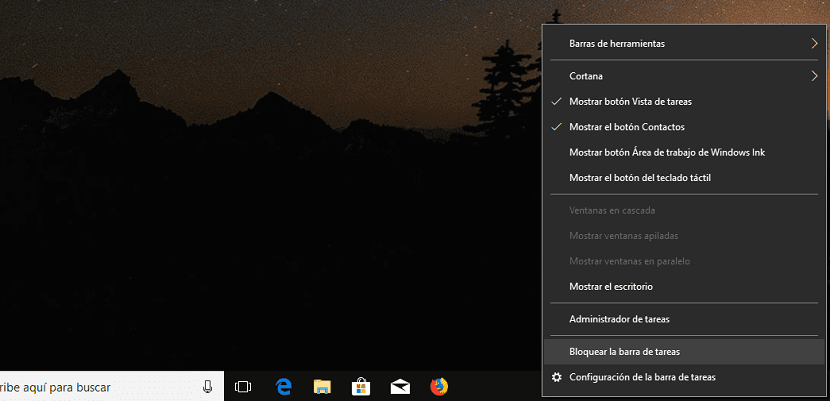
- If we want to block the position of the taskbar, once we have placed the bar in the part of the screen that we want, we go to it and press on it the right mouse button.
- In the drop-down menu we go to the option Lock the taskbar.
- From that moment, we will not be able to move the position taskbar, until we unlock it again to be able to change its position and adapt it to our needs.









