

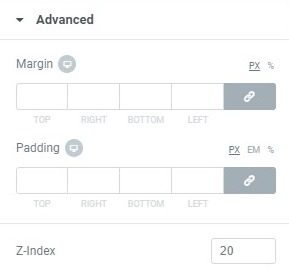
Adjust the Z index
If an element is above or below another element and the positions need to be reversed, you must change the Z-index of one of the elements. For example, if your menu is hidden by an image that is displayed at the top of the drop-down menu, you have a Z-index problem.
 es un protocolo que permite determinar una conexión segura entre el servidor y el cliente, que no puede ser interceptada por personas no autorizadas. En resumidas cuentas, es la versión segura de el http (Hyper Text Transfer Protocol) Cómo funciona Una conexión HTTP estándar en Internet puede ser fácilmente secuestrada por partes no autorizadas. El propósito de una conexión HTTPS es evitar esto: encriptar<span class="glossaryai-more-link"> <a href="https://rmarketingdigital.com/en/wiki/https/" data-wpel-link="internal">más</a></span></span></span></span></span>://rmarketingdigital.com/wp-content/uploads/2020/09/file-2swE2FwrBp-6642808.jpg)
The Z-Index property specifies the stack order of items. An item with a higher stack order will always be in front of an item with a lower stack order. To solve this, you simply need to adjust the value of the Z-index of one of the elements, which can be found in the element Advanced tongue. Make the Z-index lower or higher to move the layer below or above the other item as needed.
See also: How to use Z-Index in Elementor








