
Crea un efecto de encabezado transparente pegajoso genial usando la clase CSSConcepto de CSS¿Qué es el CSS?CSS es un lenguaje de programación que se usa para definir el estilo y el aspecto de un documento que se ha escrito mediante de un lenguaje de etiquetas, como HTML. Conocido además como hojas de estilo en cascada, es el que se emplea para dar colores, indicar tipos de letra o inclusive resaltar aspectos como el espacio entre items para dotar de estilo a plus de Elementor.
You will learn to:
- Make your sticky header transparent
- Use CSS to create an animation transition
- Change the minimum height when scrolling
- Go Templates> Theme Builder> Header and edit your header template.
- Right-click the section identifier in the header to edit the section.
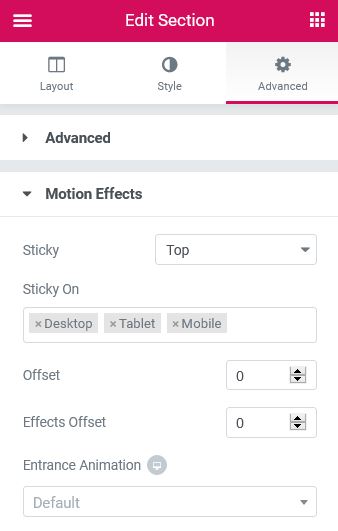
- On the dashboard, go to Advanced> Motion Effects.
 es un protocolo que permite determinar una conexión segura entre el servidor y el cliente, que no puede ser interceptada por personas no autorizadas. En resumidas cuentas, es la versión segura de el http (Hyper Text Transfer Protocol) Cómo funciona Una conexión HTTP estándar en Internet puede ser fácilmente secuestrada por partes no autorizadas. El propósito de una conexión HTTPS es evitar esto: encriptar<span class="glossaryai-more-link"> <a href="https://rmarketingdigital.com/en/wiki/https/" data-wpel-link="internal">más</a></span></span></span></span></span>://rmarketingdigital.com/wp-content/uploads/2020/09/file-PWb1NReWO2-8531004.jpg)
Advanced
Motion effects
- Sticky: Click Top to choose to paste the header at the top. Other options include Lower or None.
- Sticky: Choose the devices to paste the header, including desktop, tablet, and mobile.
- Make up for: Sets the number of pixels to shift before the header becomes sticky.
- Effects compensation: Sets the number of pixels to shift before header effects occur.
Note: The Offset Effects options only work when custom CSS is applied.
Custom css
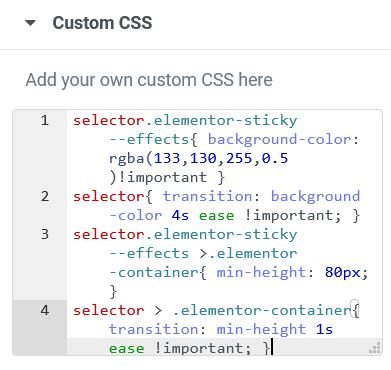
Add your own custom CSS here. Here is an example of CSS that changes the background color, transparency, and height of the header, with an anti-aliasing animation effect.
selector.elementor-sticky - effects {background-color: rgba (133,130,255,0.5)! important}
selector {transition: background-color 4s ease! important; }
selector.elementor-sticky - effects> .elementor-container {min-height: 80px; }
selector> .elementor-container {transition: min-height 1s ease! important; }
Note: This CSS will take effect when the user has scrolled the number of pixels specified in the Scroll options.








